


You probably know the scene already. A quote lives in one app, the invoice is created in another, stock gets updated somewhere else, and finance spends Friday afternoon chasing down which number is correct. Nobody planned to build a messy stack, but once the team starts duct-taping tools together, the cost shows up in duplicate entry, delayed approvals, and end-of-month reconciliation chaos.
That is why all-in-one business management software keeps showing up on shortlist discussions. The point is not just fewer logins. The point is one shared data model that lets sales, operations, finance, HR, and projects work from the same record instead of arguing over three versions of the truth, and that's the kind of consolidation Zynthoro is built around.
Table of Contents
- The Moment a Tool Stack Stops Working
- What All-in-One Business Management Software Actually Is
- The Shared Database and Why It Matters
- The Modules an SME Actually Uses Day to Day
- Where AI and Voice Fit Into the Picture
- The Practical Wins for Small Business Owners
- Your Evaluation Checklist Before You Sign Anything
- A Realistic Adoption Path for a Small Team
The Moment a Tool Stack Stops Working
The breaking point usually isn't dramatic. It's a sales rep promising a delivery date from an old stock view, then support discovering the item wasn't available, while finance sees an invoice that doesn't match the order. Everyone worked hard, but the business still paid the price for information arriving late.
The hidden tax of disconnected apps
Once a team crosses a certain size, the stack starts charging a tax nobody budgeted for. People retype the same customer details, recheck the same numbers, and ask the same approval question in three different places. That's where work slows down, not because the team is lazy, but because the system forces extra handling.
The pain isn't the number of tools. It's that each tool knows only part of the job.
BetterCloud's SaaS data shows why this problem keeps getting worse before it gets better. The average company used 106 SaaS apps in 2024, only a small drop from 112 in 2023, and the consolidation rate fell from 14% to 5% year over year. BetterCloud also says 70% of IT teams prefer all-in-one SaaS management platforms, and 70%+ of organizations are expected to centralize SaaS application management using an SMP by 2028, up from less than 30% in 2025 (BetterCloud SaaS statistics).
For SMEs, that backdrop matters. Tool sprawl is not just an IT headache, it becomes a finance problem, an operations problem, and a customer service problem all at once. A platform like Zynthoro enters the conversation because it gives a team one operational workspace instead of asking people to keep stitching apps together after hours.
What All-in-One Business Management Software Actually Is
One well-organised workshop instead of scattered toolboxes in different rooms. In the workshop, each station has a purpose, but everything sits on the same floor, uses the same inventory, and feeds the same ledger. That's the core idea behind all-in-one business management software.
A shared workspace, not a loose bundle
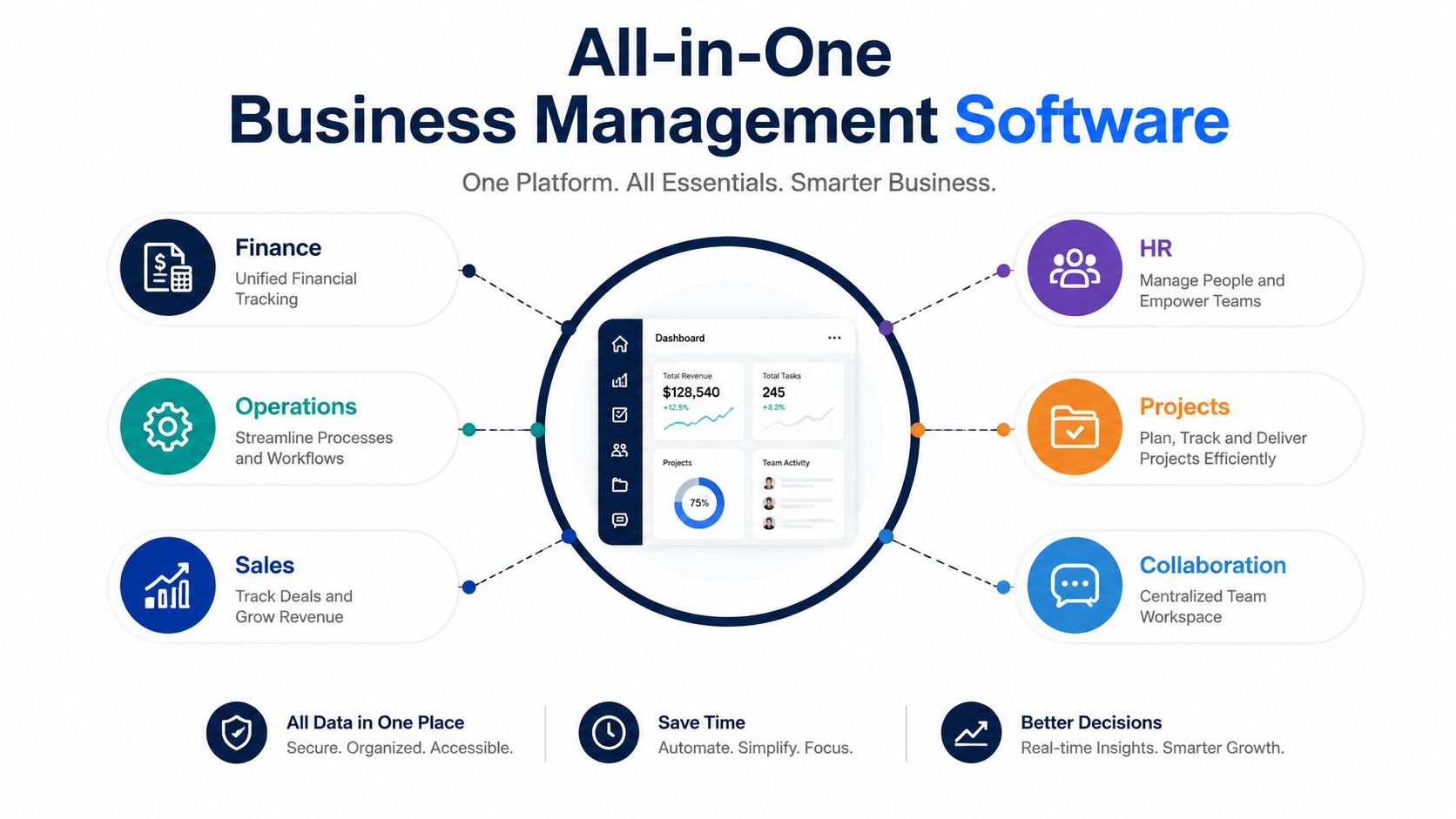
A true suite combines finance, operations, sales, HR, projects, and collaboration inside one system. The important part is not that the modules sit next to each other on a menu, it's that they speak to the same records, follow the same workflow rules, and present a consistent experience to the user.
The Canadian trade agency BDC describes these platforms as software that can integrate accounting and invoicing, CRM, project management, collaboration, time tracking, and sometimes email marketing, social media management, and website creation tools (BDC all-in-one business software). That gives you the practical shape of the category, but the test is whether the modules are connected or just bundled under one brand.
How to tell a real suite from a fake one
A fake “all-in-one” product often behaves like a set of separate apps with one login. You still export CSV files, still reconcile duplicates, and still discover that one module updates in real time while another waits for a manual refresh. A real suite removes those seams.
One useful reference point is Zynthoro's twelve-domain workspace. It's a concrete example of what this category looks like in practice, because the platform is built around connected operational domains rather than isolated features. If a vendor can't explain how its modules share data, it's probably a bundle, not an integrated system.
Business is listed with €899/mo, includes full time tracking and sales, basic accounting and operations, 3 company workspaces, 10 users, and unlimited emails, which shows how a suite can be packaged for growing SMEs without turning into an ERP-heavy rollout.
The Shared Database and Why It Matters
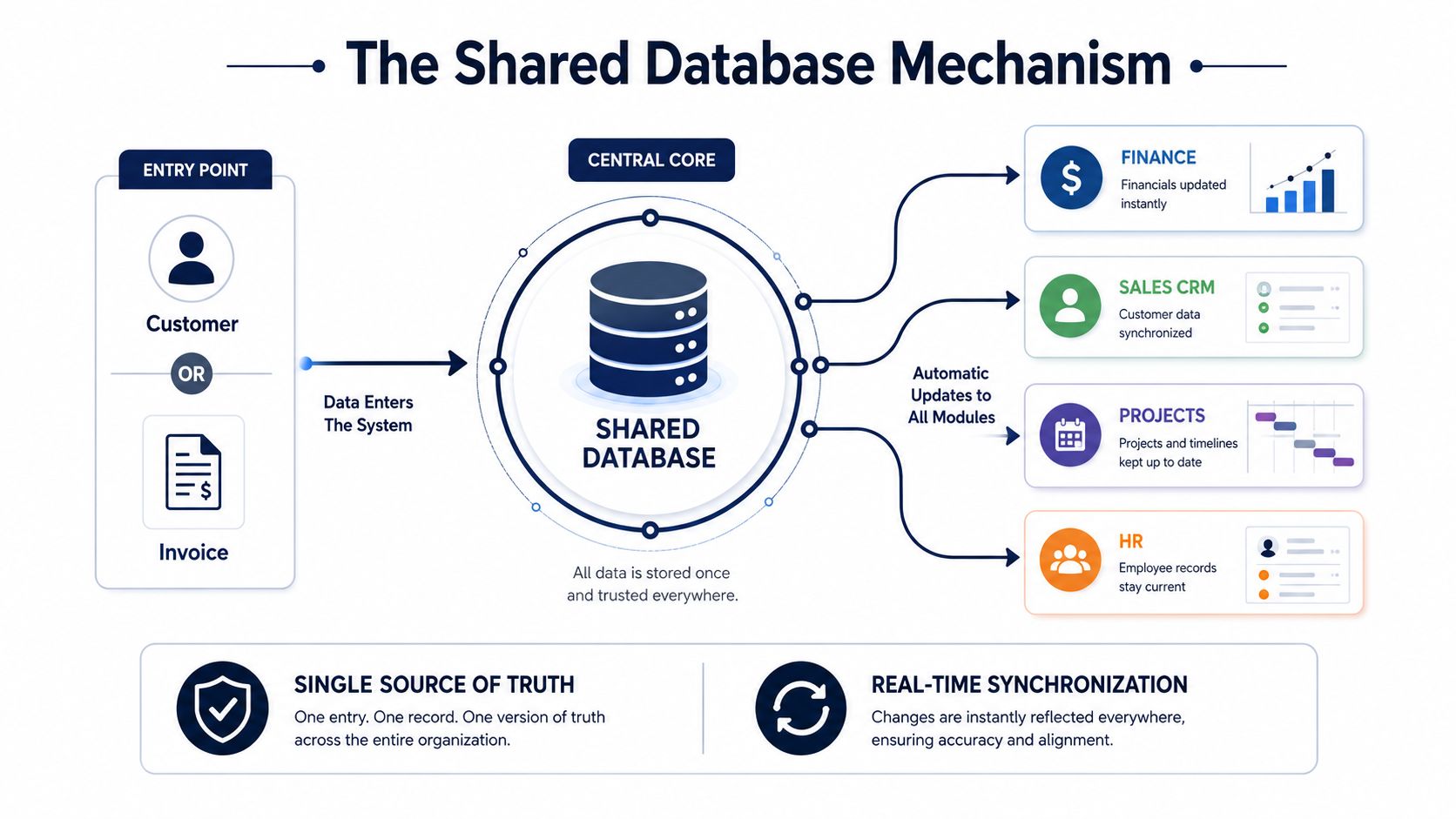
The core value sits underneath the interface. A technically solid platform depends on a single shared database and integrated workflows, because that is what turns a suite into a single source of truth instead of a set of related screens.
Why one record should update many places
A salesperson creates a deal. The system should not make someone else re-enter the customer, the order, and the payment details. The record should move through connected modules automatically, so duplicate entry drops and accounting, inventory, approvals, and reporting stay aligned.
Mazon Tech explains this architecture clearly, a shared database plus integrated workflows lets actions in one module automatically update the others, so a sale can update accounting, inventory, approvals, and reporting without duplicate entry (Mazon Tech on all-in-one business management). That is the mechanism, not just the promise.
Why this beats patchwork integrations
Many SMEs try to solve the problem with manual exports or app connectors. That works until the workflow becomes too fragile to trust. One delayed sync, and the team is back to checking spreadsheets, reissuing invoices, or asking where the latest stock count came from.
Practical rule: if a process still depends on someone remembering to sync data, the process is not integrated yet.
Technavio's market view shows why companies are moving toward stronger platforms. It estimates the business management software market will increase by USD 421 billion between 2024 and 2029, at a 12.8% CAGR, with 11.5% year-over-year growth in 2024–2025 (Technavio). Keel's Gartner-linked reporting also cites the worldwide ERP software market at US$66 billion in 2024, growing 11.3% year over year (Keel ERP reporting). For an SME owner, the point is simple, more teams are moving toward systems that keep the operational truth in one place.
The Modules an SME Actually Uses Day to Day
A small business doesn't need twelve labels on a sales page. It needs jobs done cleanly, every day, without a person acting as the glue between systems. That's where the module list matters.
The daily workflow, not the feature list
Planning and OKRs should give the owner and team one view of priorities. Time tracking should attach hours to the right project, client, or internal task without a separate timesheet ritual. Purchase administration should keep supplier orders, approvals, and inventory aligned so a buyer isn't chasing three people for one purchase.
Sales administration needs to hold quotes, orders, customers, and pipeline together so the sales team can move from lead to invoice without switching systems. Accounting and invoicing should handle the ledger, VAT-ready reporting, billing, chasing, and reconciliation in one place. Project management should cover assignments, progress, and handoffs, while HR and personnel should cover contracts, leave, payroll, and onboarding.
Operations and processes are where a lot of SMEs feel the biggest relief, because approvals, reminders, and automation stop living in somebody's inbox. Marketing and content should connect campaigns, copy, visuals, and publishing. Communication and collaboration should reduce tab switching by keeping chat, meetings, and documents close to the work.
For teams that make physical products, the manufacturing layer matters too. Recipes, multi-level BOMs, work orders, quality control, lot traceability, and cost roll-ups are the difference between a pretty dashboard and a system that can run production.
What to look for if you need more than office work
Juntrax's guidance is useful here because it names the controls SMEs should evaluate, such as Gantt charts, Kanban boards, milestones, real-time inventory monitoring, cloud document management, HR functions, workflow automation, time tracking, and sales-marketing integration (Juntrax all-in-one business management software). Those aren't nice extras. They're the tools that decide whether the system reduces manual work or just moves it around.
Agency appears as €1,199/mo, with full accounting and inventory, pro project management and marketing, 5 company workspaces, 25 users, and team structures, which makes the package shape easier to understand for multi-client teams.
Where AI and Voice Fit Into the Picture
A lot of platforms treat AI like a chat box sitting on top of old workflows. That's not very useful when the job is capturing what happened, assigning the next step, and keeping the record current without extra admin.
Embedded AI does the operational glue work
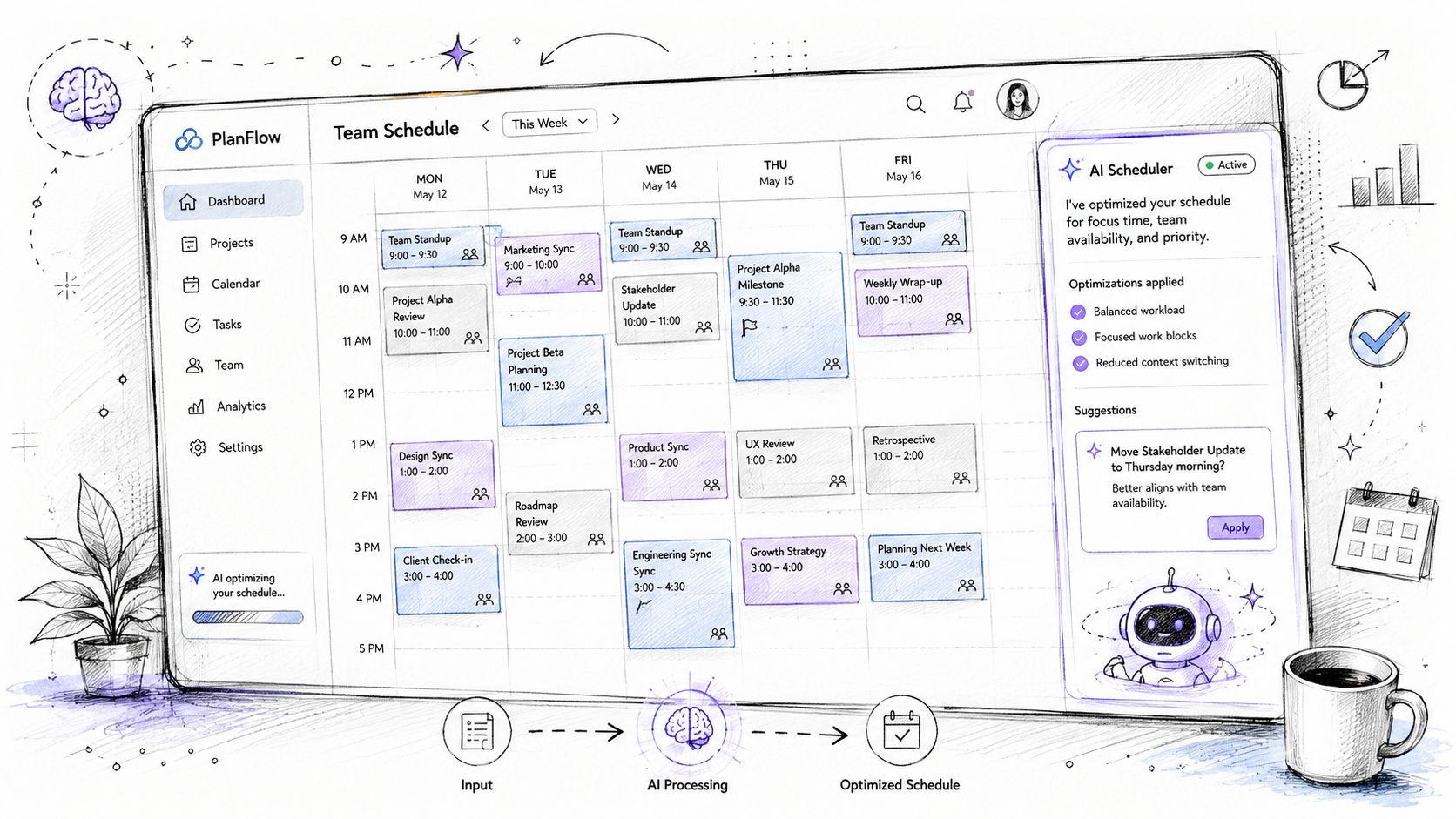
Embedded AI works inside the module, not beside it. It can help schedule, capture time automatically, draft project status summaries, or reduce the friction of entering data after a site visit or production check. The value comes from shortening the distance between a real-world event and the system record that reflects it.
Zynthoro's assistants, Zyntha, Thoro, Zyona, and Zynthoro Assist, are built into the workspace with embedded Claude integration, which shows what AI-native design looks like when it's tied to workflows instead of floating above them. The same logic applies to voice input, hands-free entry matters when someone is on the shop floor, in a warehouse, or driving between client visits.
A quick read on the adoption trade-off
Kickstart 1 is listed at €79 one-time, with AI Assistants, 50 credits/month, Planning and Time Tracking, Communication module, and Canva Studio, which makes it easy to see how smaller teams might begin with AI-assisted coordination before expanding the rest of the stack.
The key point is simple. AI helps most when it's close to the work. A separate chatbot can answer questions, but an embedded assistant can help create the record, route the approval, and keep the team aligned without another handoff.
The Practical Wins for Small Business Owners
Owners do not buy software for architecture diagrams. They buy it because one Friday afternoon they are tired of fixing the same operational mistakes twice. That is where the value becomes visible.
One shared system changes the week, not just the sales demo.
What changes in the week, not just on the demo
Month-end reconciliation gets easier when sales, invoicing, and accounting follow the same data path. Finance stops chasing mismatched entries and works from the same figures the rest of the team already used. The usual “which version is final” conversation fades because there is only one record to check.
Customer quotes move faster when pricing, stock, and sales sit in the same workspace. A rep does not need to check one screen for availability, another for the price, and a third for approval. The quote can go out while the conversation is still warm, which matters when the customer is ready to decide.
HR onboarding also gets calmer when contracts, leave, payroll, and internal documents sit together. A new hire does not have to wait while three departments assemble the paperwork. The manager can get the person into the system and onto the schedule without shuffling folders or retyping the same details.
Why the cost case is really an operating case
The BDC benefits list matches what owners feel in practice, time and cost savings, simplified billing, reduced IT complexity, no duplicate data entry, lower risk of errors, automated workflows, better communication, improved productivity, simplified training, better company-wide visibility, and real-time reporting (BDC all-in-one business software). Those are not abstract perks. They are the daily savings that come from one source of truth.
If one person has to retype what another person already approved, the business is paying twice.
That is the operational pain behind tool sprawl. Duplicate entry wastes time, but it also creates tiny mismatches that show up later as missing approvals, delayed handoffs, and messy reconciliation at the end of the month. A shared data model removes the extra copy step, so each team reads and updates the same record instead of maintaining its own version.
For European SMEs, Zynthoro adds a practical data-residency angle because it is EU-hosted and positioned around GDPR-ready controls. The platform's public recognition signals, including Anthropic Claude for Startups and XPRIZE nominee 2026, are credibility markers rather than proof of fit.
Your Evaluation Checklist Before You Sign Anything
A demo can make almost anything look integrated. The test is whether the platform holds up under your actual workflow, your actual edge cases, and your actual reporting needs. That's where a simple checklist keeps you honest.
Ask these questions before you commit
- Module depth: Can the platform handle the exact work you do, not just a generic version of it? Ask how quotes, approvals, inventory, and reporting work in one live flow.
- Data residency and compliance: Where is the data hosted, who can access it, and what audit trail exists for changes? For an EU SME, this is not optional.
- AI integration: Is AI built into the workflow, or is it bolted on as a separate assistant that creates more switching?
- Manufacturing fit: If you make products, can it handle recipes, BOMs, work orders, quality control, and traceability without awkward workarounds?
- Total cost of ownership: What do you pay for now, and what costs disappear when the stack gets smaller? Include migration effort, training, and support time in the comparison.
Two buying traps to avoid
The first trap is underestimating migration. Moving records, cleaning data, and retraining people takes longer than most vendors imply. The second trap is confusing “integrated” with “available in the same product family,” because those aren't the same thing.
Kickstarter 2 is listed at €149 one-time, with 60% of Starter, lifetime access, Everything in K1, 150 credits/month, Finance and Invoicing, Sales module, and AI photo/video suite, which shows how to compare entry points without losing sight of module depth.
A Realistic Adoption Path for a Small Team
Don't flip the whole business overnight. Pick one workflow, usually finance or sales, and run it for a full business cycle so the team can feel where the friction disappears and where the edge cases still live. Then expand into the modules that share data with that pilot.
Retire one legacy tool per quarter if you can. That pace is slow enough for people to adapt, but fast enough to prevent the old stack from dragging the new one back into spreadsheet habits.
As AI assistants mature, the best platforms will feel less like software you operate and more like teammates that handle the operational glue. That's the direction Zynthoro is built for, and it's the cleanest way for a small team to move from app sprawl to a single working system.
If you're ready to replace disconnected tools with one operational workspace, take a closer look at Zynthoro. It brings finance, sales, operations, HR, projects, and AI-assisted coordination into one EU-hosted platform so your team can stop reconciling data and start running the business.