


Your factory doesn't need another software brochure. It needs one system that stops the daily drag of hopping between an Excel BOM, a separate accounting tool, a paper QC sheet, and three different chat threads just to answer a simple question about what's ready, what's late, and what's missing.
That's the problem behind the search for the best ERP for manufacturing. In 2026, “best” isn't the platform with the longest feature list. It's the one that helps a small manufacturer collapse fragmentation fast, keep production honest, and avoid a rollout that burns time, money, and morale before anyone sees value.
Table of Contents
- The Real Cost of Tool Sprawl in a Small Factory
- Match the ERP to Your Production Model First
- The Three ERP Categories Every SME Should Compare
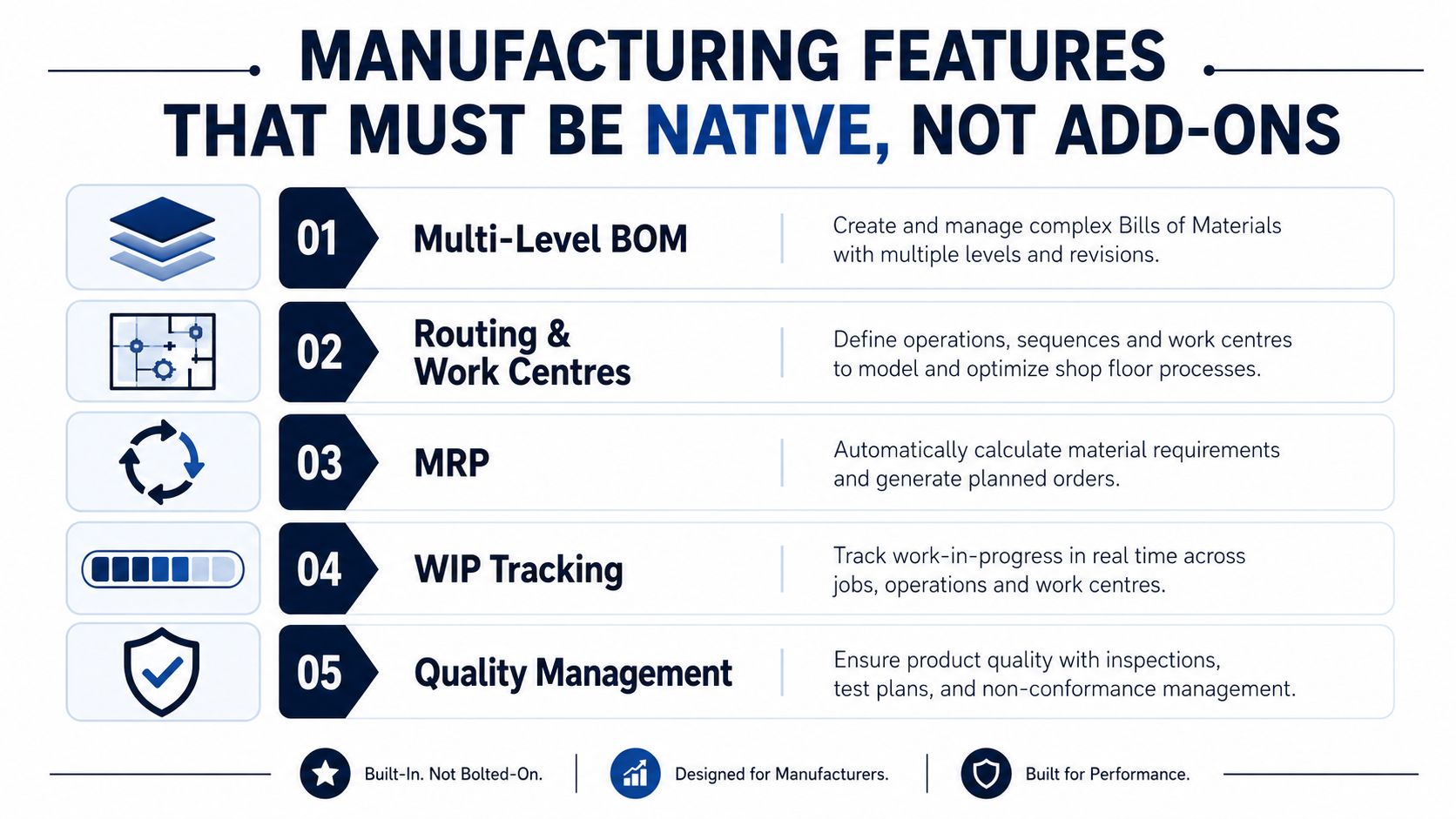
- Manufacturing Features That Must Be Native, Not Add-Ons
- Why Zynthoro Is the AI-Native Choice for Manufacturing SMEs
- Pricing Models and the Three-Year Cost of Ownership
- A Weighted Selection Framework You Can Run in Two Weeks
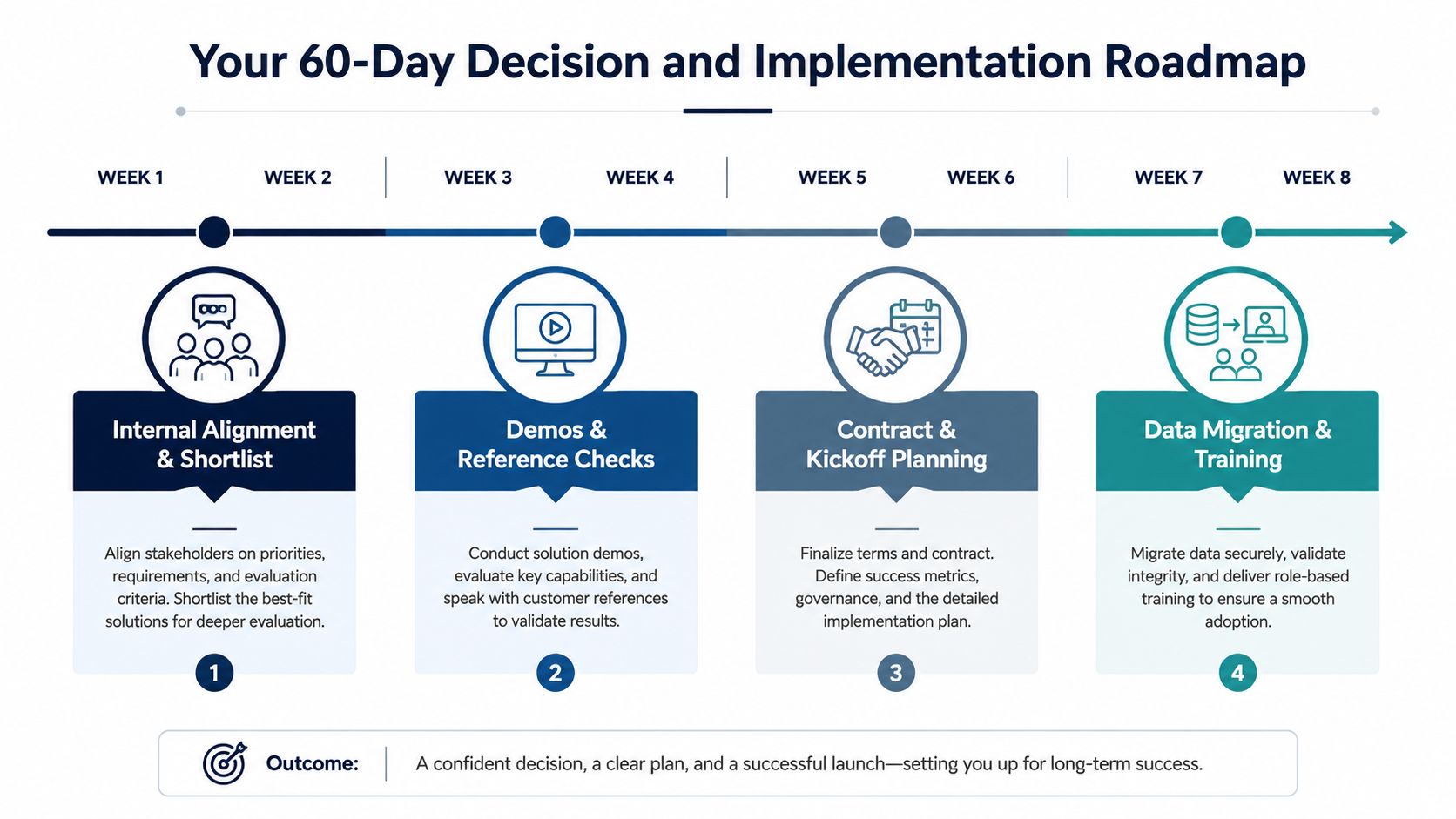
- Your 60-Day Decision and Implementation Roadmap
- Quick Glossary of Manufacturing ERP Terms
- Buyer Profile to Recommended ERP Category
- FAQ on Switching to a Manufacturing ERP in 2026
The Real Cost of Tool Sprawl in a Small Factory
The owner is on the shop floor with a tablet in one hand and a printout in the other. One screen has the BOM in Excel. Another tab has accounting. The QC log is still on paper, and the production supervisor is answering a question from purchasing in a separate chat thread.
That setup feels normal right up until it starts costing you. Someone keys the wrong revision, the buyer orders against an old quantity, or finance closes the month with numbers that don't match production reality. The issue isn't laziness, it's tool sprawl, and it gets expensive fast because every handoff becomes a chance to re-enter data, miss a change, or delay a decision.
For a small manufacturer, the best ERP is not the one with the biggest demo deck. It's the one that reduces fragmentation quickly and gives you one operational version of the truth across production, finance, purchasing, and quality. That's exactly why modern buying has shifted away from generic software shopping and toward fit, scale, cloud delivery, and process model alignment. ERP Research's 2026 manufacturing guide makes that shift explicit, ranking SAP S/4HANA Public Cloud, Infor CloudSuite, and Epicor Kinetic as top systems by fit, not by one universal standard, and SAP's small-manufacturing guidance pushes the same message, focus on industry fit, scalability, and cloud suitability rather than chasing a generic shortlist. ERP Research's manufacturing ERP guide makes that point directly, and SAP's small manufacturing guidance reinforces it.
Practical rule: if a system makes you keep Excel alive for BOMs, production status, or quality logs, it's not consolidating your operation, it's just sitting beside it.
What this guide helps you decide
You're not choosing between “good software” and “bad software.” You're choosing between categories of systems that solve different problems.
- Cloud-enterprise suites for companies that need breadth and governance.
- Mid-market specialists for manufacturers with more complex production and a partner-led implementation model.
- AI-native all-in-one platforms for SMEs that want fewer tools, lower hidden admin load, and faster consolidation.
That's why the table of contents matters here. Start with your production model, then compare ERP categories, then score manufacturing depth, pricing, and implementation risk. If you skip straight to feature lists, you'll end up buying the loudest demo instead of the right operating system.
Match the ERP to Your Production Model First
Start with how you make things. That single decision does more to narrow the field than any vendor brochure ever will.
A discrete manufacturer builds assemblies from parts. A process manufacturer works from formulas or recipes. An engineer-to-order shop designs around each customer job. A make-to-stock plant produces to forecast. And many SMEs are really mixed-mode, which means they do more than one of these on the same floor.
The wrong ERP fit shows up later as custom fields, bolt-on modules, and brittle workarounds. The right fit handles the objects your team already uses, like multi-level BOMs, routing, work centres, work orders, recipes, lot traceability, and QC checks, without forcing your staff to translate everything into generic accounting language.
| Production model | Required ERP objects | Common SME examples |
|---|---|---|
| Discrete | Multi-level BOMs, routing, work orders, serial traceability | Machine shops, electronics assemblers |
| Process | Recipes, batch records, lot traceability, QC holds | Food, cosmetics, chemicals |
| Engineer-to-order | Revision control, job costing, change management, project-linked production | Custom equipment builders, metal fabricators |
| Mixed-mode | All of the above in a flexible structure | Small plants with both configured and repeat products |
If you want a quick self-check, use this rule. If your team talks about parts and assemblies, you need BOM depth. If they talk about formulas and batches, you need recipe control. If they talk about customer-specific drawings and revisions, you need engineering change management. If they do all three, you need a system built for mixed-mode, not a generic finance suite that happens to have a production module.
There's a reason this matters before vendor demos. Industry guides treat multi-level BOMs, routing/work-centre operations, WIP tracking, MRP, quality management, and landed-cost allocation as baseline manufacturing capabilities, not extras. If the platform can't support your core production objects natively, you'll pay for the gap later in implementation time and complexity. This manufacturing ERP checklist view is a good reminder that the production model has to drive the shortlist.
A small but useful example. If you run a cosmetics line and need batch traceability, a generic ERP with a “quality add-on” may look fine in the demo. The first time you need to isolate a lot, manage rework, and reconcile cost roll-ups across ingredients, the cracks show.
If you're comparing systems, Kickstarter is one entry point to review in that context. The public snapshot shows Kickstart 1, €79 one-time, with AI Assistants, Planning & Time Tracking, a Communication module, and Canva Studio. That's useful as a reference point for lightweight consolidation, not as a substitute for manufacturing depth.
The Three ERP Categories Every SME Should Compare
Most manufacturers don't need ten categories. They need three realistic paths.
The first path is the cloud-enterprise suite, usually represented by systems from SAP or Oracle. These are built for breadth, governance, and large-scale process control. They're powerful, but they're also heavier to implement and harder to keep lean.
The second path is the mid-market specialist, like Epicor or Infor. These platforms are shaped around manufacturing use cases and are often the right answer for discrete, mixed-mode, or more demanding production environments.
The third path is the AI-native all-in-one platform, which consolidates more of the business into one workspace and tries to remove the hidden costs of fragmented tools. For SMEs, that category is about reducing admin load and speed of adoption as much as raw functionality.
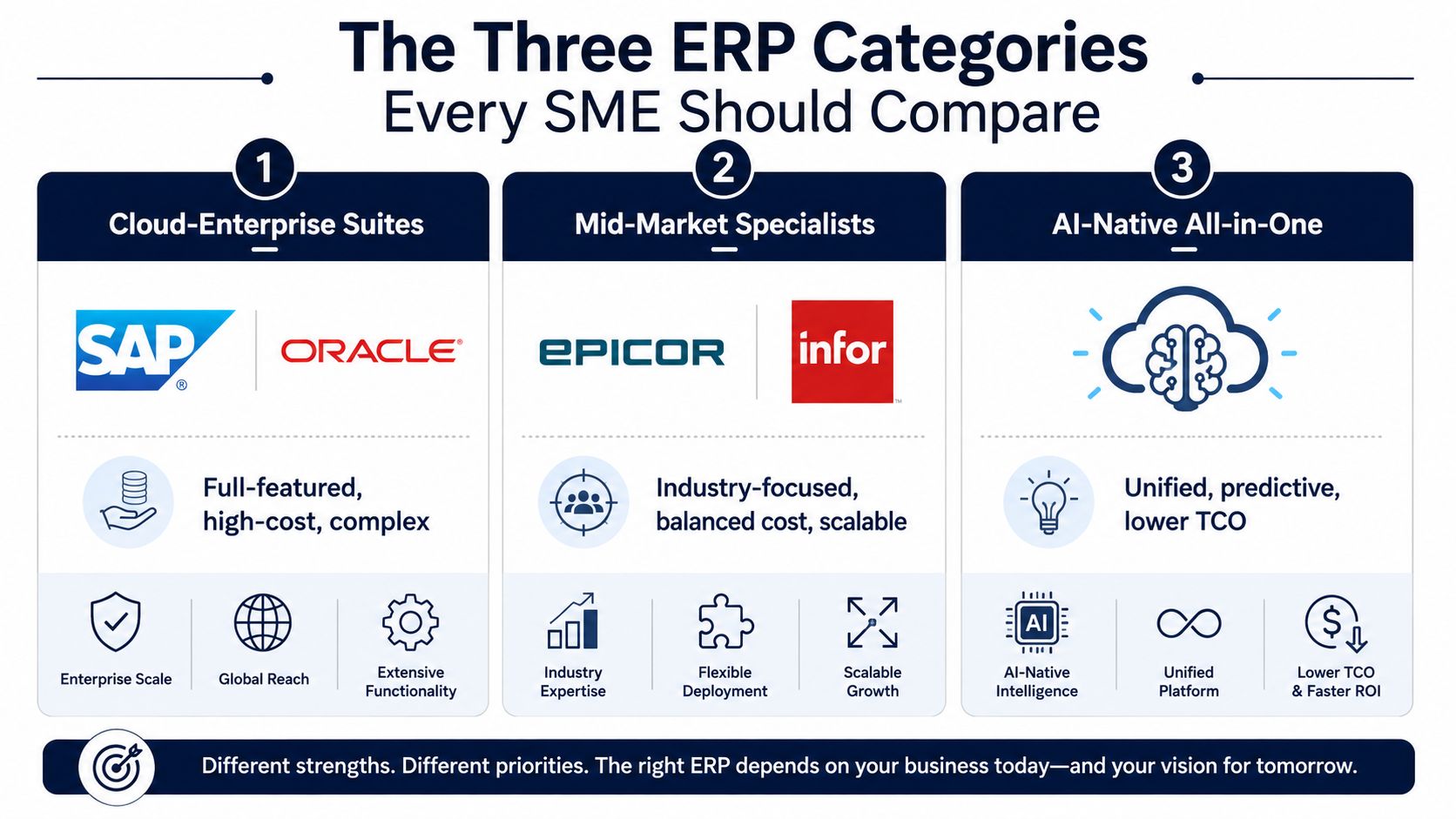
| Category | What it's optimized for | What it tends to lack | Who should buy it |
|---|---|---|---|
| Cloud-enterprise suites | Deep governance, broad functional coverage, standardized control | Simplicity, speed, low-friction rollout | Larger SMEs, multi-site teams, standardized processes |
| Mid-market specialists | Manufacturing depth, industry templates, production control | Lightweight setup, fast self-implementation | Discrete, mixed-mode, and complexity-heavy manufacturers |
| AI-native all-in-one | Consolidation, lower tool sprawl, simpler daily operations | Deep enterprise breadth in every corner | SMEs that need one system, not many tools |
Here's the blunt version. If you're a smaller manufacturer with a lean team, the enterprise suite is rarely the first move unless you already have the budget, the process discipline, and the implementation support to absorb it. If your production is complex, the specialist wins on depth. If your biggest pain is disconnected tools and you want one environment that blends operations, finance, and collaboration, an AI-native platform deserves serious attention.
Opinionated take: don't buy a platform because it has the biggest logo wall. Buy the one that your team can actually live in every day.
That's where Zynthoro belongs in the conversation. It's an AI-native ERP built around twelve connected domains in one EU-hosted workspace, with embedded Claude-powered assistants and production support for recipes, multi-level BOMs, work orders, QC, lot traceability, and cost roll-ups. For SMEs that want consolidation first and complexity second, that's a meaningful category shift, not just another software skin.
The category choice should match your company shape, your region, and your production model. If your plant is standardized and multi-layered, the cloud enterprise suite may fit. If your line is specialized, the mid-market manufacturer suite may fit better. If you're drowning in app sprawl, AI-native consolidation is the obvious category to test.
Manufacturing Features That Must Be Native, Not Add-Ons
A manufacturing ERP has to understand production, not just invoice it. If the core objects aren't native, your team will spend months stitching together workarounds that turn into permanent process debt.
The essentials are straightforward. You need multi-level BOMs, routing and work centres, MRP, WIP tracking, quality management, lot and serial traceability, cost roll-ups, and landed cost allocation. Industry guidance treats these as baseline manufacturing capabilities because bolt-ons and third-party patches usually become the weak link when volume rises or traceability matters. RFgen's manufacturing ERP guidance is clear that buyers should test production planning, inventory, quality control, financial management, BI, reporting, and mobile access against real workflows before committing.
What native really means in practice
A native feature is one your team can use without jumping to another system for the next step. If production builds a job, the system should understand the BOM, reserve materials, track work in progress, and carry cost into finance. If quality flags a defect, the lot should be traceable immediately, not after someone exports three reports and reconciles them manually.
- Multi-level BOMs: needed when a finished item is built from subassemblies, not a single parts list.
- Routing and work centres: needed when operations move through defined steps, machines, or lines.
- MRP and WIP tracking: needed when you want planning and live production status inside one system.
- Quality management: needed when a non-conformance has to be handled in the same flow as production.
- Traceability and cost roll-up: needed when you must follow lots forward and backward, then understand what each job cost.
A food company feels this first. A batch issue can't sit in a separate spreadsheet while production keeps moving. A cosmetics brand feels it too, because rework, traceability, and lot control are part of the margin, not a side activity.
If a vendor says, “We can integrate that,” ask what happens when the integration fails, lags, or gets ignored by operators. That's where hidden cost lives. Native manufacturing depth is boring in the demo and priceless in the warehouse.
Why Zynthoro Is the AI-Native Choice for Manufacturing SMEs
Zynthoro makes sense when a manufacturer has outgrown spreadsheets, email chains, and separate tools, but still doesn't want a giant implementation project. That's the buyer profile it's built for, especially in Europe where EU hosting, GDPR-ready controls, audit trails, and role-based access are not nice-to-haves.
Its advantage isn't just that it has production features. It's that those features sit inside a broader operating system. Zynthoro connects finance, operations, sales, marketing, HR, communication, compliance, and production in one environment, so your team isn't copying data from one app to another just to keep orders moving.
Where it fits best
For food, cosmetics, pharma, and light manufacturing, the interesting part is the production layer. Zynthoro supports recipes, multi-level BOMs, work orders, quality control, lot traceability, and cost roll-ups, which are the exact mechanics SMEs need when they want tighter control without buying an oversized suite.
The embedded AI layer also matters. Zynthoro includes Zyntha, Thoro, Zyona, and Zynthoro Assist, with hands-free voice input across devices. For a production manager or owner who's moving between desk and floor, that can reduce the amount of admin work that gets pushed to the end of the day.
Practical rule: if the team spends more time updating systems than running jobs, the software is too fragmented.
Zynthoro's case is strongest when the pain is cross-functional drag. If purchasing, finance, and production all work from different systems, one unified workspace can remove a lot of hidden effort. That includes the small costs people ignore, like duplicate entry, status chasing, and misaligned reports.
This doesn't make it the right fit for every buyer. A larger plant with heavier process complexity, deep manufacturing specialization, or a very specific regulatory stack may still prefer a more established mid-market suite. But for SMEs that want an AI-native ERP with manufacturing depth and less tool sprawl, Zynthoro belongs on the shortlist.
The answer to the best ERP for manufacturing question, for this buyer, is simple. Pick the system that lets your team work in one place, keeps production objects native, and doesn't force the plant to adapt around disconnected software.
Pricing Models and the Three-Year Cost of Ownership
The price on the proposal is not the price of the system. For manufacturers, the bill includes migration, setup, training, process clean-up, and the drag of running two systems during transition.
There are three pricing models you'll see again and again. Per-user SaaS is easy to understand, but it grows with headcount and feature expansion. Per-module enterprise licensing looks tidy on paper, then expands through implementation and maintenance. Lifetime or kickstart licensing can reduce subscription pressure, but you still need to budget for support, adoption, and any extra modules you activate later.
If you're comparing a small, lean rollout against a larger suite, that's the right lens. Zynthoro's public catalog gives a concrete anchor for a lower-friction path. Kickstarter 3 is listed as Kickstart 3, €199 one-time, with Everything in K2, 300 credits/month, Accounting & Operations, Project management, and Marketing & Content. That doesn't make it a manufacturing package by itself, but it does show how lifetime licensing changes the cost conversation.
The hidden costs that usually get missed
Implementation cost shows up in places vendors don't lead with. Data migration takes time. User training takes time. Process cleanup takes time. If your shop floor loses visibility during rollout, that's not a software issue anymore, that's an operations issue.
The smartest buyers ask one question before they sign. How long until the system is usable in production, not just installed? That's the difference between a tool that helps the business and one that becomes a project.
Budget rule: don't compare license fees in isolation. Compare the license plus implementation plus the disruption of switching.
The cheapest system is not always the lowest-cost system. A lighter, faster deployment that gives you usable production and finance control sooner can be better than a bigger suite that needs months of process design before anyone trusts it. That's why implementation economics matter so much for SMEs.
A Weighted Selection Framework You Can Run in Two Weeks
If you want to shortlist sensibly, weight what matters. For a small manufacturer, I'd score production fit at 30%, time-to-value at 20%, compliance and data residency at 15%, AI and automation depth at 15%, total cost at 10%, and vendor viability at 10%.
That weighting forces honesty. A system can't win just because it has nice dashboards. It has to fit the way you produce, get live quickly, protect your data, and reduce admin instead of creating it.
Two-week shortlist process
Days 1 to 3, align internally.
Name the production model, the top bottleneck, and the essential modules.Days 4 to 7, run vendor demos.
Make every vendor show your actual workflow, from order entry through production and shipping.Days 8 to 12, call references and test a sandbox.
Ask how long the rollout took, what broke, and what the team still does outside the system.Days 13 to 14, score and decide.
Don't extend the process unless a vendor cannot prove a critical capability.
Use the demo to expose shortcuts. If a vendor can't show lot traceability, actual work order handling, and cost visibility on your products, don't let them hide behind generic screens. Make them work through your real case, not a polished sample item.
The goal here isn't perfection. It's removing the wrong options fast so you can spend your energy on the systems that might work.
Your 60-Day Decision and Implementation Roadmap
The fastest clean rollout starts before the contract is signed. Weeks 1 and 2 are for internal alignment and shortlist finalization. Weeks 3 and 4 are for demos and reference checks. Weeks 5 and 6 are for contract work and kickoff planning. Weeks 7 and 8 are for data migration and a pilot module going live.
If you're handing vendors a demo script, keep it focused. Ask them to show how they handle your five most important scenarios, then stop talking about abstract features and watch the workflow.
- Order to production: how does a sales order become a work order?
- BOM change: how is a revised component list handled without breaking old jobs?
- QC failure: what happens when a lot fails inspection?
- Costing: how does the system roll materials and labor into job cost?
- Traceability: can you find the affected lot quickly, both forward and backward?
The sequencing matters too. Turn on finance and production first. Delay marketing and HR if you need to protect time-to-value. Those functions can wait. The shop floor can't.
A lot of manufacturers try to launch everything at once and then wonder why the team resists. Keep the first wave tight. If the first live module gives the owner, the planner, and finance one shared picture of production and cost, adoption gets much easier.
Quick Glossary of Manufacturing ERP Terms
BOM means bill of materials, the list of parts and quantities needed to build a product. Example, a machine assembly BOM might include motors, housings, and fasteners.
Routing is the step-by-step path a job follows through production. Example, a batch might move from mixing to filling to packing.
MRP means material requirements planning, the logic that tells you what to buy or make and when. Example, the system flags a shortage before the next run starts.
WIP means work in progress, items that have started production but aren't finished yet. Example, half-built units on the floor count as WIP.
QC means quality control, the checks used to confirm output meets standards. Example, a QC hold stops a lot that fails testing.
Lot traceability lets you track a batch or lot forward and backward through the supply chain. Example, you can see which shipment used a specific ingredient lot.
Cost roll-up is the process of adding material, labor, and overhead into a job cost. Example, the system totals the true cost of a finished order.
Landed cost is the full cost of getting material into your plant, not just the invoice price. Example, freight and duties can change what an imported part really costs.
Buyer Profile to Recommended ERP Category
| Buyer profile | Recommended ERP category | Next step |
|---|---|---|
| Food SME under 30 staff | AI-native all-in-one or mid-market specialist | Test lot traceability and QC handling first |
| Cosmetics brand under 50 staff | AI-native all-in-one | Check recipe management, costing, and compliance controls |
| Light manufacturer 50 to 200 staff | Mid-market specialist | Compare production depth against implementation effort |
| Multi-entity producer | Cloud-enterprise suite or mature specialist | Confirm reporting, governance, and multi-site control |
| EU-regulated pharma-adjacent business | Specialist or AI-native with strong compliance controls | Verify audit trails, access control, and data residency |
If you're still unsure, use this three-line prompt. What do we make? What breaks most often? How fast do we need value? Your answer will usually point to the right category.
If your team is trying to replace disconnected tools, the shortcut is simple. Pick the platform that fits your production model, keeps the core manufacturing objects native, and won't bury you in implementation overhead.
FAQ on Switching to a Manufacturing ERP in 2026
How risky is migration from spreadsheets or a legacy tool?
It's risky if you try to move everything at once. Start with one production line or one product family, clean the master data first, and keep the pilot narrow. The safest move is a controlled rollout that proves order, inventory, and costing before you expand.
Can the ERP run on the shop floor without constant internet?
That depends on the platform, so test it in the real environment, not in the office. Ask for a live demonstration on the devices your operators use, and make offline behavior part of the vendor evaluation if your plant has weak connectivity.
What does multi-entity or multi-site support look like?
It should give you shared visibility with controlled separation. You want consolidated reporting, site-level execution, and role-based access so one plant doesn't overwrite another plant's data.
What should I do if I'm stuck mid-decision?
Cut the shortlist to two systems and run the same demo script on both. Then score them on production fit, time-to-value, compliance, automation, total cost, and vendor responsiveness. If one vendor can't show your workflow clearly, stop waiting.
If you want one system that brings production, finance, and operations into a single EU-hosted workspace, Zynthoro is built for that job. It gives manufacturing SMEs native tools for recipes, BOMs, QC, traceability, and cost roll-ups without forcing the team back into disconnected apps. Visit Zynthoro and see whether it fits the way your factory works.