



You've probably got a finance platform, a spreadsheet for stock, a CRM for prospects, a project tool, a payroll system, a point-of-sale export, and a handful of files that only one person knows how to open. After years of adding tools, your business now depends on 8 to 15 disconnected systems, each holding part of the truth.
Moving that information into a unified ERP isn't an export-import chore. It's a decision about ownership, governance, sequencing, and business continuity. A disciplined data migration strategy protects your margins, audit trails, customer records, and ability to invoice when the old tools are switched off. Zynthoro gives SMEs a connected workspace across finance, sales, operations, HR, projects, and production, but the platform can only produce clean results when the migration is planned around how your business works.
Table of Contents
- Why Your Migration Strategy Matters Before the First Import
- Discovery and Scoping the Source Systems
- Data Mapping and Cleansing the Messy Reality
- Staging, Transformation, and Test Migrations
- Cutover Planning, Validation, and Reconciliation
- Rollback Procedures That Work Under Pressure
- Post-Migration Checks and Your First 90 Days
Why Your Migration Strategy Matters Before the First Import
A familiar failure starts with good intentions. The owner chooses a migration weekend, asks each department to export its data, and assumes the new ERP can absorb everything. Finance later finds that customer names differ between systems, operations discovers that stock codes don't match, and sales learns that several active accounts were hidden in a spreadsheet. The team spends the weekend repairing history instead of validating the new system.
That's why strategy matters before anyone touches a record. A widely cited benchmark associated with Bloor Research surveys says 75% of data migration projects fail to meet their objectives or run over budget and schedule. The figure is discussed in industry migration commentary, and its practical lesson remains clear: data quality, reconciliation, testing, and rollback aren't technical afterthoughts.
A lift-and-shift approach treats every record as equally important. An owner-led plan does the opposite. It asks which data protects cash flow, which records support compliance, which dependencies can interrupt operations, and which history can be archived rather than transformed immediately.
The cost of skipping scope
Suppose your business imports customer accounts, products, supplier balances, and open invoices into Zynthoro without deciding who owns each dataset. Cleansing then becomes an endless debate. Sales wants every old contact. Finance wants only verified billing accounts. Operations needs product codes that match purchasing and stock movements. Nobody can agree on what “complete” means.
A phased approach exposes those conflicts early. You can test customer and supplier masters first, then opening balances, then open documents, while checking that Zynthoro's Accounting, Sales Administration, Purchase Administration, and Stock workflows receive compatible information.
Practical rule: Treat every migration wave as a business-risk decision. Move the data that enables the next operational process, not the data that happens to be easiest to export.
The market's scale reinforces this point. The global data migration market was valued at USD 19.29 billion in 2024, projected to reach USD 21.49 billion in 2025 and USD 37.46 billion by 2030, with a projected 11.69% CAGR, according to enterprise data migration market coverage. Migration now sits inside cloud adoption, application modernization, compliance, and consolidation programs. For a small business, the strategic payoff is simpler: Zynthoro can become the trusted system of record only if each connected module receives data that has been assigned, cleaned, tested, and reconciled.
Discovery and Scoping the Source Systems
Start discovery with a list, not a workshop full of assumptions. Open a shared document and record every place where business information lives. Include formal applications, local databases, spreadsheets, paper-based exports, integrations, and files maintained by people who aren't system administrators.
Use four columns for the first pass:
- System name, such as accounting software, CRM, payroll, POS, webshop, spreadsheet, or shared drive.
- Owner, the person accountable for what the data means and whether it remains active.
- Approximate records, using a sensible estimate rather than false precision.
- Downstream dependency, such as invoicing, VAT reporting, stock replenishment, payroll, customer service, or management reporting.
The inventory should include forgotten sources. A sales coordinator may keep the newest customer phone numbers in a spreadsheet. A shop manager may export daily sales from a POS system and never upload the files to the accounting platform. A production supervisor may hold batch information in a workbook. These sources often contain the operational detail that formal systems lack.
Mark risk before mapping destinations
Flag data containing customer personal information, VAT records, payroll details, supplier bank information, or production traceability records. Those categories need tighter access, clearer retention decisions, and more careful cleansing. Zynthoro includes GDPR-ready controls, audit trails, and role-based access, but governance still starts with knowing what you're importing and who may view it.
Then map each source to a destination. Finance data belongs in Accounting and the Ledger. Product quantities and stock movements belong in Stock. Customers, contacts, quotes, orders, and pipeline data belong in Sales Administration and CRM. Supplier records and purchase orders map to Purchase Administration. Employees, contracts, leave, payroll, and onboarding map to HR & Personnel. Recipes, bills of materials, work orders, quality checks, and lot records map to Production management.
| Source System | Owner | Approx Records | Target Zynthoro Module |
|---|---|---|---|
| Accounting platform | Finance lead | To be confirmed | Accounting and Ledger |
| CRM or sales spreadsheet | Sales lead | To be confirmed | Sales Administration and CRM |
| POS or webshop export | Operations lead | To be confirmed | Sales Administration and Stock |
| Supplier and purchasing files | Procurement lead | To be confirmed | Purchase Administration |
| Production workbook | Production lead | To be confirmed | Production management |
| Payroll or HR system | People lead | To be confirmed | HR & Personnel |
For an agency or multi-client team, Agency is listed as a full non-ERP suite for agencies and multi-client teams, with full accounting and inventory, project management and marketing, five company workspaces, and twenty-five users with team structures. That distinction matters if you're evaluating whether a product is an ERP or a narrower operating suite.
Finish discovery with a one-page scope freeze. The business owner signs off on sources included, records kept, records archived, regulated datasets, module owners, and excluded history. Don't begin cleansing until that page has an owner's name and approval date.
Data Mapping and Cleansing the Messy Reality
Clean data is created through decisions, not optimism. A source column called Client might contain a company name, a contact person, an outdated trading name, or a note such as “paid by parent company.” Zynthoro needs a defined customer master, not a free-text approximation.
Create a field-level mapping for every dataset. For each source field, specify the target field, transformation rule, required status, default treatment, and validation owner. Pay particular attention to dates, currency codes, tax treatment, email addresses, customer names, product identifiers, and payment terms.
A date stored as day-month-year can be interpreted incorrectly if the target expects month-day-year. A currency code may be missing from a legacy invoice. A customer called “Northside Ltd,” “Northside Limited,” and “Northside” may represent one account or several. Don't let the import tool guess.
Resolve duplicates before they reach live workflows
Duplicate customers distort sales activity and receivables. Duplicate SKUs inflate apparent inventory and can cause purchasing or production teams to select the wrong item. Orphaned product codes create broken links between sales orders, purchase orders, stock records, and reports.
Use deterministic rules:
- Customer identity: Match on a verified legal name, registration detail, billing address, or approved customer identifier.
- Product identity: Match on a controlled SKU, manufacturer code, barcode, or owner-approved replacement rule.
- Supplier identity: Match on verified legal entity details and payment information.
- Transaction ownership: Preserve the source document identifier so finance can trace the imported record.
Don't merge records because names look similar. Send ambiguous matches to a named business owner. The owner should decide whether two entries are duplicates, related entities, branches, or deliberately separate accounts.
Use a repeatable cleansing loop
Cleansing is the cheapest place to fix a defect. Once bad data reaches a live ERP, the same issue can appear in invoices, stock movements, VAT reports, customer statements, and audit trails.
Run this loop:
- Profile the source and list missing values, duplicates, invalid formats, unmatched references, and unusual totals.
- Define a rule for each defect, with an owner who approves the treatment.
- Dry-run the rule on a 1% sample, as a controlled test rather than a production change.
- Apply the approved rule to the working dataset.
- Re-profile the result and document remaining exceptions.
- Obtain written sign-off that the error threshold is acceptable before loading.
The rule is not “make the file look tidy.” The rule is “make the data behave correctly in Zynthoro's connected workflows.” A customer master is clean when invoicing, sales history, payment matching, and reporting all identify the customer consistently.
Staging, Transformation, and Test Migrations
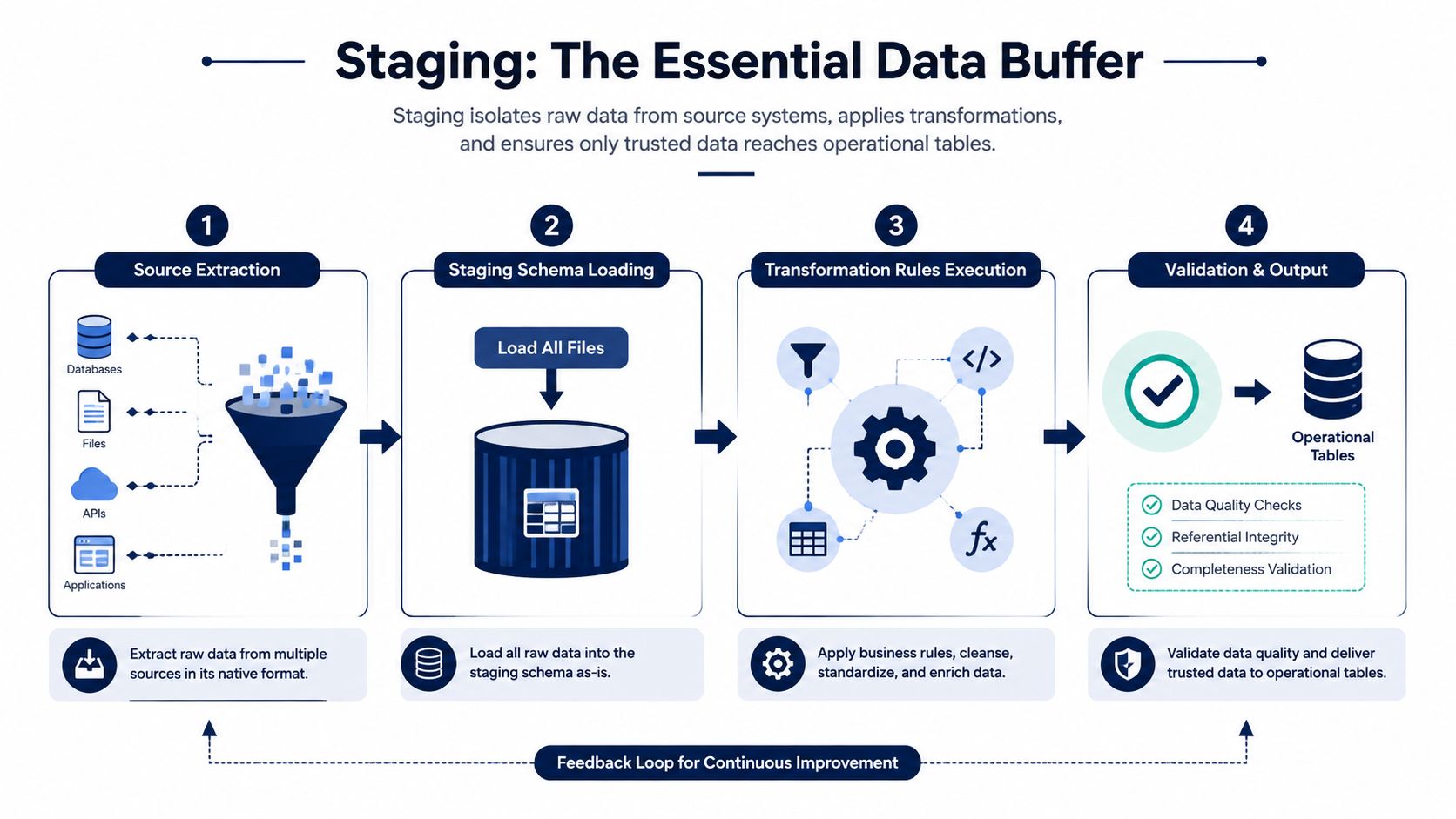
Staging is a buffer, not a shortcut. Extracted files should first enter a separate staging schema, where transformation rules can run without touching live operational tables. If a mapping unexpectedly converts an item code, changes a tax field, or rejects a supplier record, you want the failure contained and explainable.
Use a master-data-first sequence. Load customers, suppliers, items, and the chart of accounts before you load financial balances or documents. Those masters provide the references that later records need.
A sequence that protects dependencies
A practical wave order looks like this:
- Master data, including customers, suppliers, items, units, tax rules, and accounts.
- Opening balances, with finance control totals and approved cut-off dates.
- Open transactional documents, including open invoices, purchase orders, in-flight shipments, and other work that still affects operations.
- Historical read-only data, limited to what the business needs for reporting, customer service, audit, or legal retention.
This sequence lets Zynthoro's connected modules absorb information in the same order that the business uses it. A sales order can reference a customer and item. A purchase order can reference a supplier and item. An invoice can post against an account and customer. Loading history first reverses those dependencies and makes defects harder to isolate.
Test twice, reconcile twice
Run at least two tests for every wave. The first is a dry run that measures transformation failures, rejected records, and rule coverage. The second is a reconciliation run that compares source and target row counts, control totals, references, and exception lists.
The migration workbench should record why each rejected record failed. “Import error” isn't useful. “Customer missing billing country” or “SKU conflicts with existing item code” gives the owner something to fix.
Track completeness, accuracy, throughput, downtime, and cost per record. Migration guidance uses practical targets such as 99.95% or higher data accuracy and near-zero downtime for critical cutovers, as described in migration success metrics guidance. Treat those as thresholds to define with your finance and operations owners, not as a reason to hide exceptions.
Never let a test migration touch the production tenant. Promote only after a clean run meets the agreed reconciliation thresholds and the business owner has reviewed the exceptions.
Cutover Planning, Validation, and Reconciliation
Cutover is one weekend, not one project. The project may take months of discovery, cleansing, mapping, and testing, but the live switch needs one time-bound runbook, one accountable cutover owner, one source-system freeze, and one go/no-go decision.
AWS guidance recommends naming rollback checkpoints, defining a rollback strategy, and assigning a single decision-maker for fix-forward versus rollback in its cutover stage guidance. Apply that discipline to Zynthoro even if your team is small. A small team needs clear authority more than it needs a complicated command centre.
Follow the runbook in order
The operator should be able to follow the sequence while tired:
- Freeze writes in the source systems.
- Take the final backup and verify that it can be restored.
- Run the final extraction.
- Apply the final delta since the last test load.
- Transform and load the approved data into Zynthoro.
- Run validation scripts and reconciliation checks.
- Compare control totals with the last closed source reports.
- Communicate the result at the agreed status points.
- Open the live environment only after approval.
Validation must be numeric and pre-agreed. Customer balances should match to the cent. Aged receivables should tie to the last source statement. Inventory on hand should agree with the approved physical count. Open purchase order totals should match the source control report. If a check fails, the runbook says stop. It doesn't say “clean it up later.”
| Step | Owner | Time Window | Validation Check |
|---|---|---|---|
| Freeze source writes | Source-system owners | Agreed freeze window | New writes are blocked |
| Final extraction | Migration lead | Immediately after freeze | Export files and backup are complete |
| Final delta and transformation | Migration lead | Scheduled execution window | Rejected records are within approved limits |
| Zynthoro load | ERP administrator | Scheduled execution window | Target tables accept approved records |
| Reconciliation | Finance and operations owners | Before go/no-go | Balances, stock, open documents, and counts agree |
| Decision and communication | Cutover owner | Single decision point | Open live system or hold and invoke rollback |
Keep stakeholders updated at fixed intervals. Finance shouldn't interrupt the operator for a new status every few minutes, and the operator shouldn't leave the runbook to answer messages. Assign the communication duty to someone else.
Rollback Procedures That Work Under Pressure
A rollback plan earns its place before cutover, not during an incident. For an SME replacing disconnected tools with Zynthoro's connected modules, rollback is a governance decision: define who can stop the migration, what evidence justifies that decision, and which operating state the business will restore.
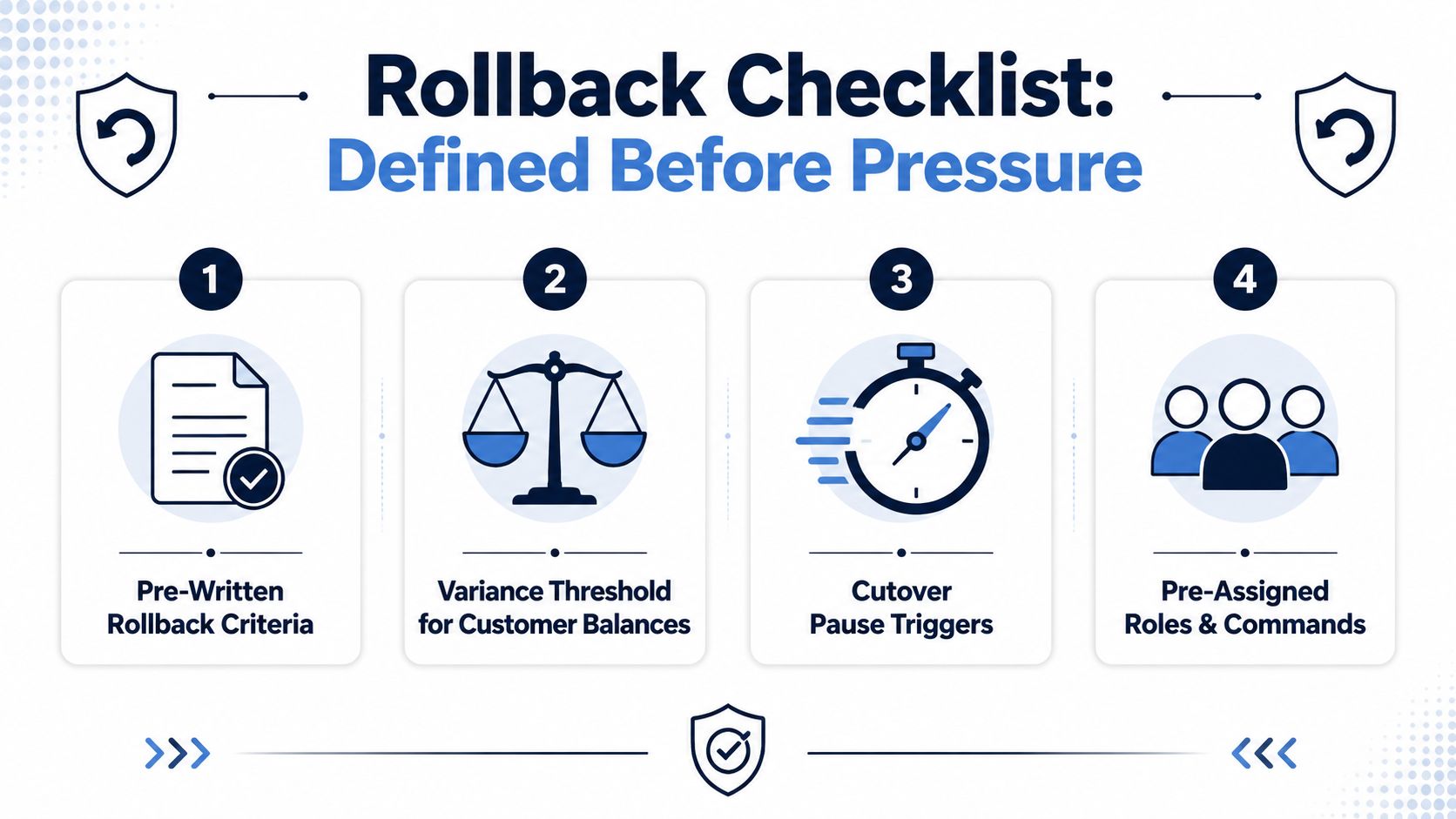
Set the criteria before the final load. Use numeric, time-bound thresholds for invoices, stock, payroll, production, and integrations, but base them on your approved tolerance and maintenance window rather than borrowed figures. Rollback planning guidance supports planning the trigger, decision owner, restoration method, and available recovery time together. The signed runbook must state what happens when a Tier 1 dataset fails validation, a critical report falls outside its expected range, or restoration cannot finish within the scheduled window.
Make the prior state restorable
Before loading the final data, snapshot the Zynthoro target. Keep the last closed source backups untouched, labelled, and tested for restoration. Pre-stage the reverse data or restoration commands required to return the business to its prior operating state. That preparation matters when several old tools are being replaced at once, because restoring one system while leaving dependent processes broken creates a second incident.
Write criteria such as:
- Finance variance: Customer balances exceed the approved variance.
- Inventory exception: Stock on hand cannot be reconciled within the agreed validation window.
- Integration failure: A critical connection cannot be restored within its response limit.
- Operational blockage: Users cannot complete invoicing, purchasing, payroll, or order fulfilment.
The exact tolerance belongs in the signed runbook. Do not create a convenient threshold during the incident.
Rehearse the decision, not just the restore
Measure rollback in staging from the first approval through data restoration, communications, and user verification. A long restoration can exceed the available maintenance window and force a different cutover decision. Record the result in the runbook, then adjust sequencing, staffing, or the go-live window before production.
Run a drill under time pressure. One person issues the command, another confirms the source state, a communications owner updates staff, and the business owner authorizes reopening the old system. AWS cutover guidance supports explicit checkpoints and decision ownership.
Use this rollback checklist video to structure the rehearsal, then adapt it to Zynthoro and the actual source systems. A rehearsed rollback gives the cutover owner clear authority to stop when the evidence requires it.
Post-Migration Checks and Your First 90 Days
A successful import doesn't prove operational success. It proves that data entered the target. The test is whether people can invoice, buy, sell, reconcile, approve, produce, report, and serve customers without returning to the old spreadsheets.
Zynthoro should become the trusted system of record through a controlled operating rhythm. Assign a named owner to every issue, keep the old source data available under controlled access, and remove temporary workarounds only after downstream reports have stabilised.
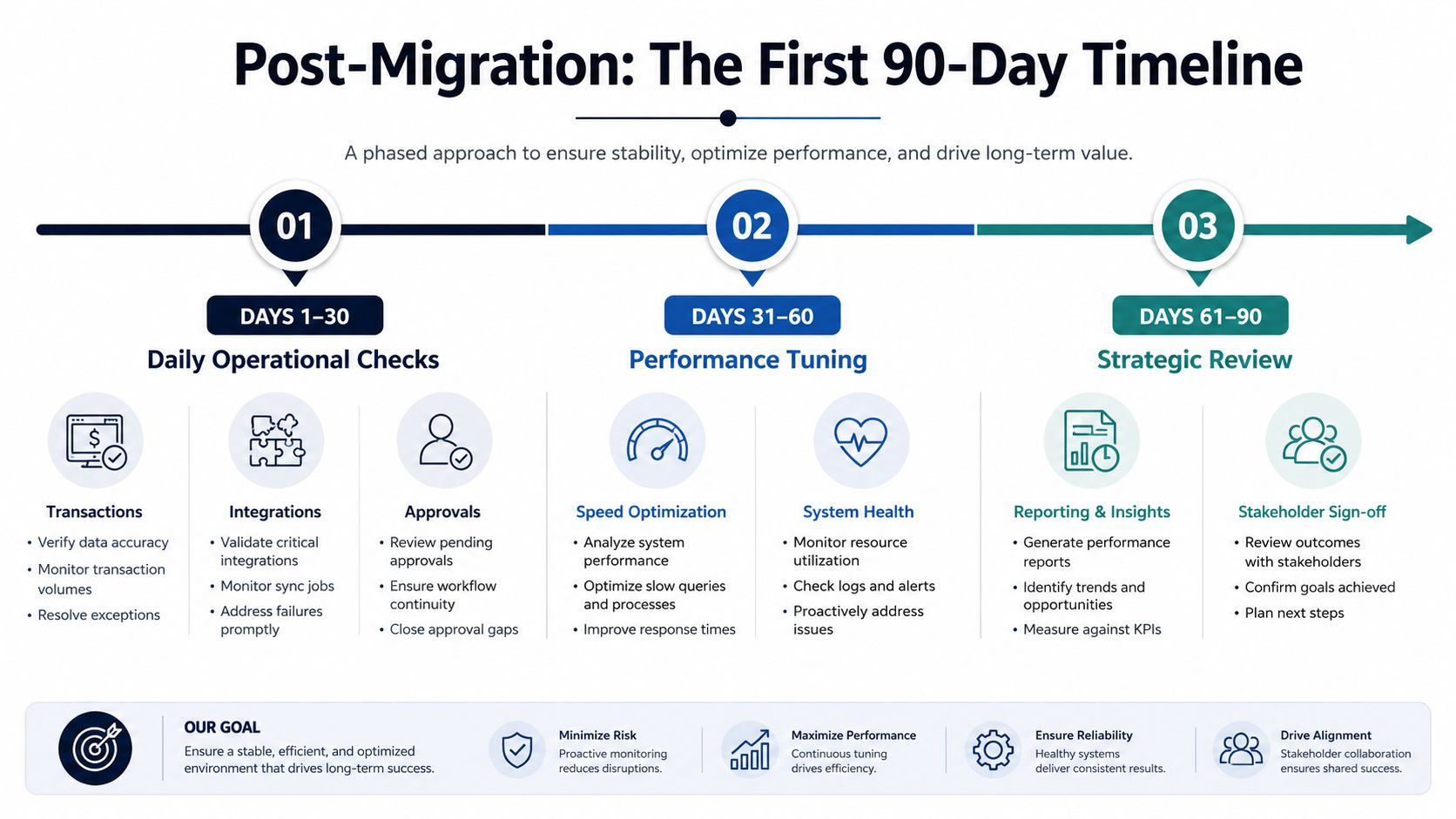
Days 1 to 30 focus on daily operations
Check transaction posting, integrations, approvals, inventory movements, customer records, supplier records, and error logs every day. Finance should reconcile financial totals. Operations should verify stock and open work. Sales should confirm customer and order workflows. HR should verify employee and payroll-related processes where those datasets were migrated.
Use a printed checklist:
- Transactions: Confirm new invoices, orders, purchases, and adjustments post correctly.
- Integrations: Review failed transfers and unresolved exceptions.
- Approvals: Test purchasing, finance, HR, and operational approval paths.
- Inventory: Compare movements, on-hand quantities, and open commitments.
- Access: Confirm that each role sees the records and actions it needs.
- Reporting: Compare critical reports with approved source outputs.
Days 31 to 60 expose structural problems
Look for duplicate masters, incorrect historical balances, weak permission boundaries, slow month-end work, and users rebuilding old spreadsheets. Fix root causes instead of adding manual patches. If a report is wrong because a mapping rule is wrong, correct the rule and document the correction.
Run the first complete month-end process in Zynthoro before declaring victory. If your business runs payroll or billing cycles, complete those workflows and confirm that the outputs reconcile with the approved controls.
Days 61 to 90 establish ownership
Formalize recurring reconciliation checks, refresh backup procedures, close open risks, and document who owns each Zynthoro module. Review close duration, integration failures, overdue work, and report-preparation effort qualitatively against the operating baseline your team recorded before migration.
Hold a post-implementation review with finance, operations, IT, and system owners. Record accepted risks with deadlines. Update the data inventory, retention decisions, mapping rules, and reconciliation schedule so governance continues after the project team disbands.
The wider evidence supports this disciplined approach. One large-scale migration analysis linked pre-migration assessment with a 59% success rate, while systematic validation, financial error control, service disruption prevention, and compliance management were linked with 85%, 91%, 94%, and 99.95% success rates, respectively, in the cited migration analysis. The figures shouldn't replace judgment, but they underline the operating principle: assessment and control matter as much as the transfer itself.
Zynthoro helps SMEs bring finance, sales, purchasing, inventory, projects, HR, operations, and production into one connected system, so your migration has a clear destination instead of another collection of silos. Review your source systems, define your first migration wave, and visit Zynthoro to see how its unified workspace can support a controlled move and the operating discipline that follows.