



You close a sale and feel the relief, then the admin begins. The quote sits in one app, the confirmed order arrives by email, inventory lives in a spreadsheet, the invoice is created somewhere else, and the bank payment still needs to be matched by hand. A single customer transaction can leave a small business owner switching between several tools, copying the same details repeatedly, and chasing cash that should already be visible.
That's the hidden cost of fragmented order to cash automation. The problem isn't only slow invoicing. Every disconnected handoff creates another opportunity for a pricing error, an overlooked order, an unapplied payment, or a customer asking for information your team can't quickly find.
Table of Contents
- Why Order to Cash Automation Matters for Small Businesses
- Capturing Orders and Fulfilling Them Without the Chaos
- Automating Invoicing and Payment Collection
- Reconciling Payments and Handling Exceptions
- Tracking the KPIs That Actually Matter
- Avoiding the Partial Automation Trap
Why Order to Cash Automation Matters for Small Businesses
A small distributor receives an order on Monday morning. Sales confirms the customer's price in an email, operations checks stock in a spreadsheet, finance creates a PDF invoice, and the owner later opens online banking to identify which invoice a payment covers. Nobody has made a dramatic mistake, but the business has spent hours moving information instead of serving customers.
The order-to-cash cycle covers the journey from order capture through fulfillment, invoicing, collections, payment application, reconciliation, and reporting. When each stage sits in a separate system, delays accumulate. Sales may promise stock that operations can't see, finance may invoice from an outdated price list, and a payment can reach the bank before its remittance details reach accounting.

What automation changes
A connected system gives each team access to the same transaction record. The customer, quote, order, inventory commitment, shipment status, invoice, payment, and ledger entry stay connected rather than being recreated at every handoff.
For an SME, that changes everyday work in practical ways:
- Fewer duplicate entries: Staff enter customer and order details once, then reuse them throughout the cycle.
- Earlier billing: The system can create an invoice from the confirmed order or fulfillment event instead of waiting for a finance administrator to rebuild it.
- Clearer cash visibility: Finance sees open invoices, received payments, unapplied cash, and exceptions in one place.
- More consistent follow-up: Reminders and collection tasks follow defined rules rather than someone remembering to check a spreadsheet.
This market has moved well beyond a niche back-office experiment. One independent market study estimates global order-to-cash automation revenue at USD 3.21 billion in 2024, with a projected USD 8.53 billion by 2033 and a 12.8% compound annual growth rate over that period, as reported in the order-to-cash automation market study. The forecast is a projection, but it reflects a clear operational reality: businesses increasingly treat O2C as a connected finance and operations layer.
Practical rule: Automate the handoffs first. A fast invoice won't solve much if the order was entered incorrectly or the payment still needs manual detective work.
Capturing Orders and Fulfilling Them Without the Chaos
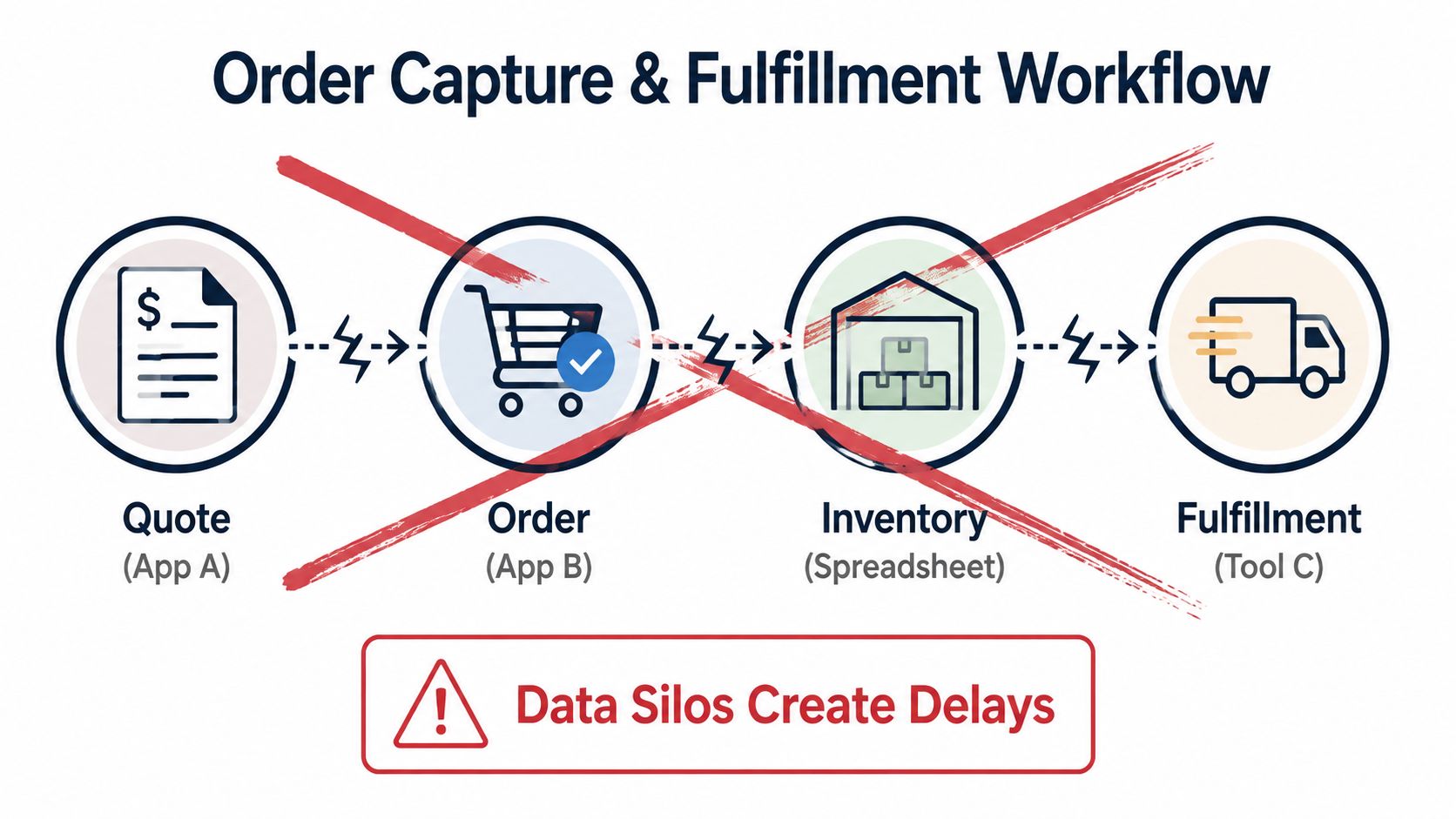
Order capture should create a reliable operational record, not another isolated document. Start by defining the path from customer inquiry to fulfillment, then remove every point where someone has to copy information between tools.
A practical flow looks like this:
- Create the quote from a controlled customer record. Use approved products, pricing, taxes, delivery terms, and customer details.
- Convert the accepted quote into an order. Don't ask sales or administration to retype the same lines.
- Validate availability and commitments. Operations should see what's in stock, what's reserved, and what's already promised.
- Release fulfillment from the confirmed order. The warehouse or service team should work from the current order, not an old email attachment.
- Keep delivery status attached to the transaction. Finance needs a reliable trigger for billing, while customer-facing staff need accurate order visibility.
A concrete example
Suppose a cosmetics wholesaler receives a request for several product lines from a retailer. In a fragmented setup, the salesperson builds a quote in a CRM, copies it into an order tool, messages the warehouse, and updates a spreadsheet when stock is reserved. If the customer changes a quantity, the salesperson may update one record while the warehouse continues using another.
With Zynthoro's Sales Administration module, quotes, orders, customers, and pipeline can remain in one flow. A confirmed order can be connected to inventory and fulfillment activity, so the operations team works from the same commercial information that sales approved.
That doesn't mean every decision should be delegated to software. Credit exceptions, unusual delivery requests, and substitutions still deserve human judgment. Automation should handle predictable validation and routing, while your team focuses on choices that require context.
For a small team that wants to combine sales and finance capabilities with a limited starting scope, Kickstarter 2 includes Finance & Invoicing, a Sales module, an AI photo/video suite, and 150 credits per month under its listed lifetime-access snapshot.
The strongest implementation habit is simple: make the order the source record. Don't let fulfillment depend on a message in a chat channel or an inventory figure that only one employee knows how to update.
Automating Invoicing and Payment Collection
Invoicing is often where operational delays become cash-flow problems. If a team waits for a person to create and send a PDF after fulfillment, the customer's payment clock starts later than it should. If payment reminders depend on a manual diary, overdue accounts can remain invisible until someone reviews the aging report.
Set up automation around clear events and ownership:
- Define invoice triggers. Decide whether billing starts when an order is confirmed, goods are shipped, a milestone is approved, or a service period ends.
- Standardize invoice data. Store customer addresses, tax details, payment terms, product descriptions, and bank information centrally.
- Create reminder rules. Schedule polite notices before and after the due date, with escalation for unresolved balances.
- Offer usable payment methods. Connect the payment options your customers already expect, then record the result against the correct invoice.
- Route disputes separately. A customer disputing one line shouldn't make the entire account impossible to manage.
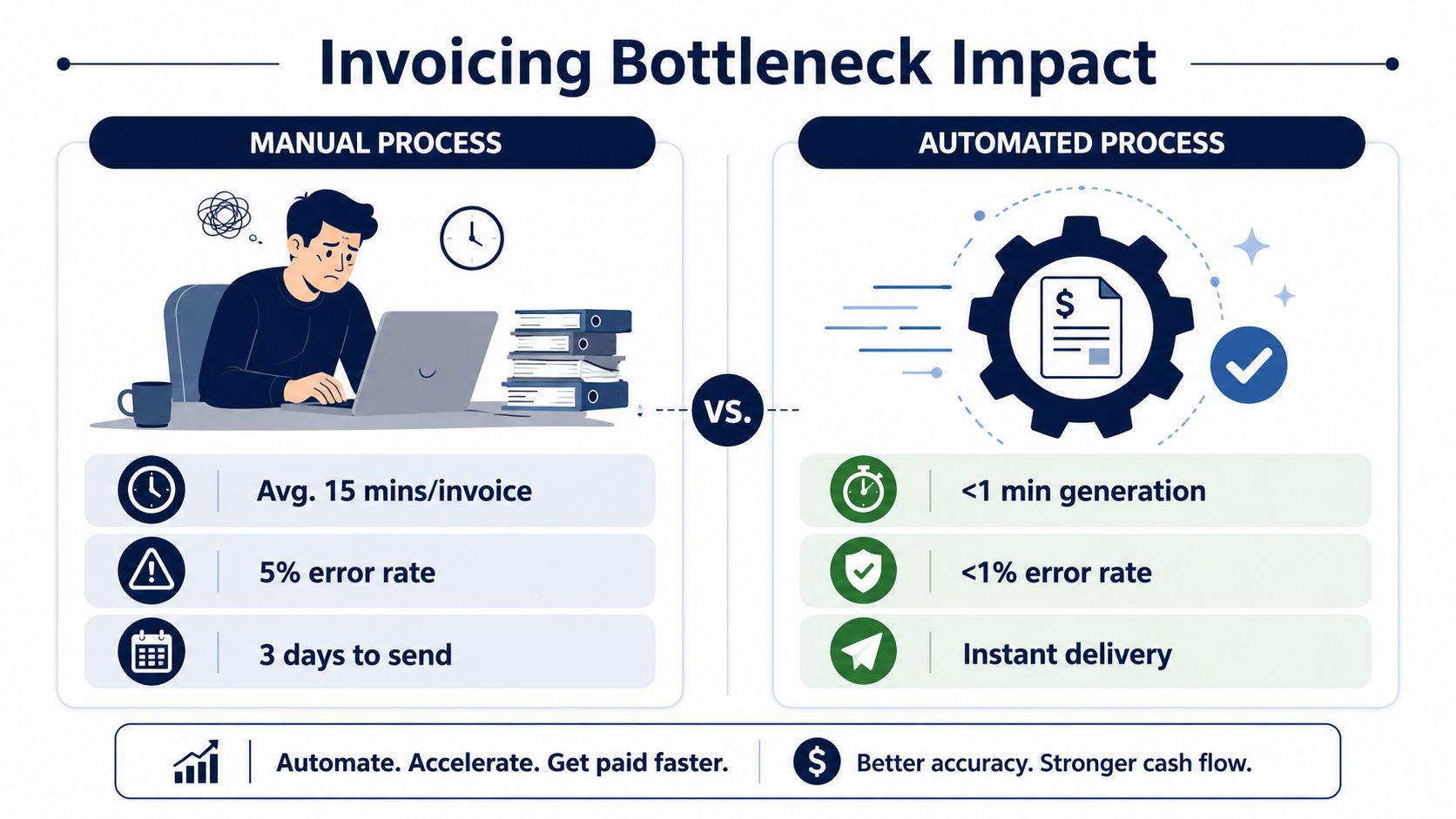
European businesses are already moving toward digital invoice exchange, although adoption remains uneven. A 2024 CEPS report found that 37% of small European companies sent eInvoices in 2023, up from 22.6% in 2018, while the gap between small and larger companies still exceeded 20 percentage points, according to the CEPS e-invoicing thematic report. For SMEs, the lesson is practical. Digital invoicing isn't a speculative technology choice, but the workflow still needs to handle different customer preferences, tax requirements, and national practices.
Zynthoro's Invoicing & Finance module is designed around automated invoice sending, chasing, and reconciliation, while its Accounting capabilities connect the ledger, VAT handling, and EU-ready reporting. A unified workspace reduces the need to export invoices from one application, upload them into another, and then reconcile the payment somewhere else.
A good rollout starts with one invoice family. Choose a repeatable service or product line, clean its customer and tax data, test the delivery and reminder sequence, and review exceptions before expanding. Automation works best when the business rules are explicit.
Reconciling Payments and Handling Exceptions
Payment reconciliation is where many automation projects reveal their weaknesses. An invoice may be paid in a lump sum, short-paid because of a dispute, settled by a parent company, or accompanied by remittance details in a separate email. A system that only matches perfect invoice numbers will still leave finance with a large exception queue.
Mature cash application follows a sensible sequence:
- Normalize incoming data. Standardize bank feeds, lockbox files, remittance emails, customer references, and payment descriptions.
- Apply deterministic rules. Match exact invoice references, customer identifiers, amounts, and approved tolerances.
- Use AI for ambiguity. Let the system identify likely matches across historical patterns and related references.
- Escalate exceptions with context. Send a human the payment, candidate invoices, customer history, and supporting remittance information.
- Record the resolution. Feed the confirmed decision back into the ledger and matching logic.
In mature implementations, AI cash application reaches 85–92% touchless match rates, compared with 45–55% for rules-based matching and 15–25% for manual processing, according to the AI cash application automation benchmark. The same source describes a 70–85% reduction in cash-application labor and a reduction in posting lag from about 2.3 days to under 4 hours for straight-through cases.
| Method | Touchless Match Rate | Typical Posting Lag |
|---|---|---|
| Manual processing | 15–25% | About 2.3 days |
| Rules-based matching | 45–55% | Varies by exception volume |
| AI cash application | 85–92% | Under 4 hours for straight-through cases |
These figures don't mean every SME will achieve the same result. Poor remittance data, inconsistent customer records, and weak payment references can limit any system. Zynthoro's value in this part of the cycle comes from keeping invoicing, reconciliation, and the real-time ledger connected, so a resolved payment updates the financial record instead of creating another manual handoff.
Design the exception queue before you design the automation. Straight-through processing is useful, but the quality of the human review path determines whether the system works in daily operations.
Tracking the KPIs That Actually Matter
An O2C dashboard should answer a small business owner's real questions. How quickly are customers paying? Are invoices correct the first time? Which accounts need attention? Where does cash stop moving?
The number of invoices sent is easy to count, but it doesn't explain whether the process is healthy. A better dashboard combines speed, accuracy, and exception visibility.
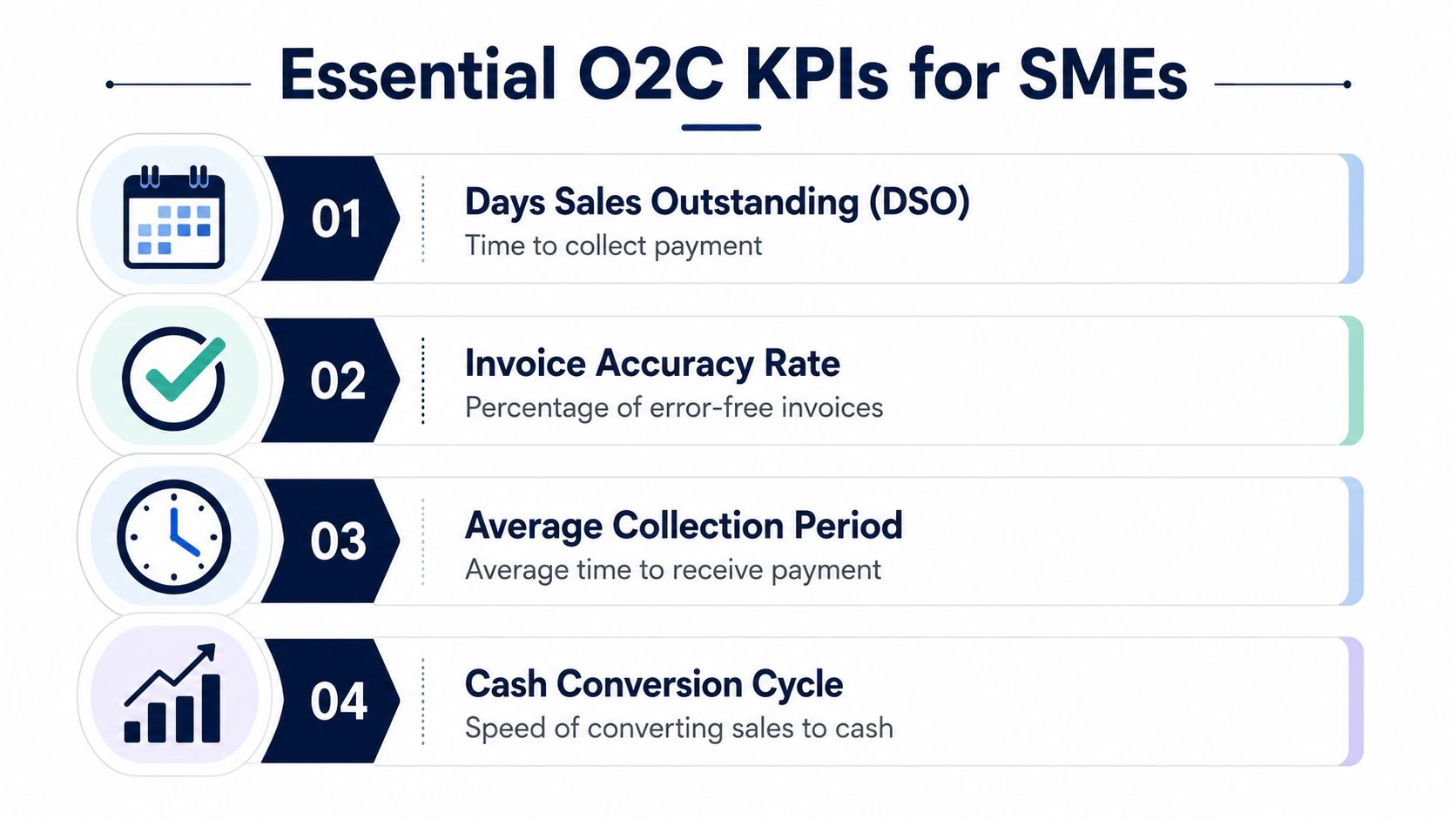
Four useful measures
- Days Sales Outstanding: Track the time between recognized sales and collected cash. Segment it by customer, sales channel, and payment terms so a broad average doesn't hide a problem.
- Invoice accuracy rate: Monitor invoices issued without corrections, disputes, or credit notes. If accuracy falls, inspect the order and master-data stages rather than asking collections to work harder.
- Average collection period: Compare how long customers take to pay with the terms your business agreed to. A widening gap may indicate weak reminders, unclear invoices, or a change in customer behavior.
- Cash conversion cycle: Connect sales, inventory, receivables, and payments. This shows whether cash is being held in stock or outstanding invoices for longer than the business can comfortably support.
Zynthoro can bring these signals into a connected finance view because its Sales Administration, Accounting, and Invoicing & Finance capabilities use the same underlying business information. That makes investigation easier. A late payment can be traced back to the invoice, the order, the fulfillment event, or an unresolved dispute without rebuilding the story from separate exports.
Review the dashboard on a regular operating rhythm. Assign an owner to each exception category, record the reason for delays, and use the trend to decide what to fix next. A KPI is useful only when someone can act on it.
Avoiding the Partial Automation Trap
Automating invoice creation while leaving order entry, customer data, and payment matching disconnected doesn't remove the O2C problem. It moves the bottleneck. Finance may send invoices faster, but the team still spends time correcting wrong prices, resolving missing delivery details, and searching for the payment that belongs to each invoice.
The risk is measurable. Organizations with low levels of data automation in the cash conversion cycle are about 20% more likely to experience revenue leakage above 5%, while O2C automation often plateaus at 30–50% when master-data quality, exception handling, and cross-system integration remain weak, according to the O2C automation benchmarking report.
A better evaluation framework
Ask four questions before buying another point tool:
- Where is the source record? If customer, pricing, order, and invoice data live in different places, integration will remain a daily responsibility.
- What happens when data is incomplete? Every workflow needs a clear exception owner and a useful escalation view.
- Can the ledger update without rekeying? Reconciliation is incomplete if the final financial entry still depends on manual copying.
- Can the setup grow with the business? A tool may solve one task but create a new subscription, export, or integration burden as operations expand.
Mature deployments are designed around exceptions, not just successful matches. The cited benchmark describes exception resolution within 8–12 hours after automated routing and payment-posting error rates below 0.5%, but those outcomes depend on clean master data, defined tolerances, and accountable review workflows.
Zynthoro connects Sales Administration, Accounting, Invoicing & Finance, and operational workflows in one AI-native ERP environment. That structure helps SMEs address the full transaction rather than automating a single isolated task. For agencies and multi-client teams comparing broader operating models, Agency is listed as a full non-ERP suite with accounting and inventory, project management and marketing, five company workspaces, and twenty-five users.
The practical starting point is an O2C map. Follow one real transaction from quote to bank reconciliation, mark every spreadsheet, inbox, approval, and manual re-entry, then fix the most expensive handoff first. Visit Zynthoro to see how its connected sales, invoicing, accounting, and reconciliation workflows can replace fragmented O2C tools with one workspace for your SME. Start with a repeatable transaction, define the exceptions, and build from evidence rather than adding another disconnected application.