


You can usually tell a small business has outgrown its sales setup when one customer exists in five places at once. The enquiry sits in somebody's inbox. The quote lives in a Word file. The follow-up is scribbled on paper. The order gets rebuilt in a spreadsheet. The invoice sits in a separate finance app.
That isn't a sales problem. It's an operating problem.
When owners tell me their pipeline feels messy, what they usually mean is simpler. Nobody trusts the handoffs. Sales retypes the same details. Operations asks which version of the quote is final. Finance chases order notes before sending an invoice. Then the owner opens a forecast and knows, instinctively, that the number is soft.
Table of Contents
- Why a Connected Sales Management Process Matters for Small Businesses
- The End-to-End Sales Management Process From Lead to Reconciliation
- Roles and KPIs That Keep the Sales Process Honest
- Where Small Businesses Get Stuck in the Sales Workflow
- How AI Assistants and Integrated Platforms Streamline the Flow
- A Realistic Example of the Process Running on One Workspace
- Comparing Disconnected Tool Stacks With a Unified Sales Workspace
- First Steps to Tighten Your Sales Management Process This Week
Why a Connected Sales Management Process Matters for Small Businesses
A sales management process for an SME shouldn't start and end with pipeline stages in a CRM. That's too narrow. If the process breaks the second a quote is accepted, you don't have sales management. You have lead tracking.
The scattered version most owners are living with
I see the same pattern over and over.
A prospect calls. Someone logs the details late, or not at all. A rep sends a quote from an old template with last quarter's pricing. The customer replies to a different email thread. Operations gets a screenshot instead of a clean order. Finance has to ask whether VAT, shipping, or payment terms were agreed. Everyone works hard. The system still leaks.
The cost shows up in dull, expensive ways:
- Re-keying data from one tool into another
- Lost context between the first conversation and the final invoice
- Internal chasing between sales, operations, and finance
- Weak forecasting because the pipeline isn't connected to real commercial progress
Practical rule: If your team has to re-enter customer, pricing, or order data after a deal is won, your sales management process is broken.
What a connected process actually looks like
A connected sales management process means one commercial record moves through the full journey. First enquiry. Qualification. Quote. Acceptance. Order. Invoice. Payment. Reconciliation.
Each stage has a clear owner. Each handoff leaves proof. Each update changes the same record instead of creating a new one elsewhere.
That matters because modern pipeline management works best when stages are defined and measurable, not left to rep intuition. Typical milestone logic includes prospecting, qualification, needs analysis, proposal, negotiation, and closed won or lost, with benchmark conversion ranges published for those stages in Apollo's guide to sales pipelines. The important point for a small business isn't the labels. It's the discipline.
Why small teams need this more than large ones
A bigger company can hide bad process with specialists. An SME can't.
The founder is often acting as sales lead, deal desk, and escalation point. The office manager may also be doing invoicing. One missed handoff doesn't stay isolated. It delays fulfilment, billing, and cash.
That's why I push owners away from stitched-together stacks and toward one operational flow. Small teams don't need more apps. They need one system that stops the same customer from being copied across five of them.
The End-to-End Sales Management Process From Lead to Reconciliation
Most owners overcomplicate this. The process is straightforward when you force every handoff to leave a clean record.
Here's the shape of it.
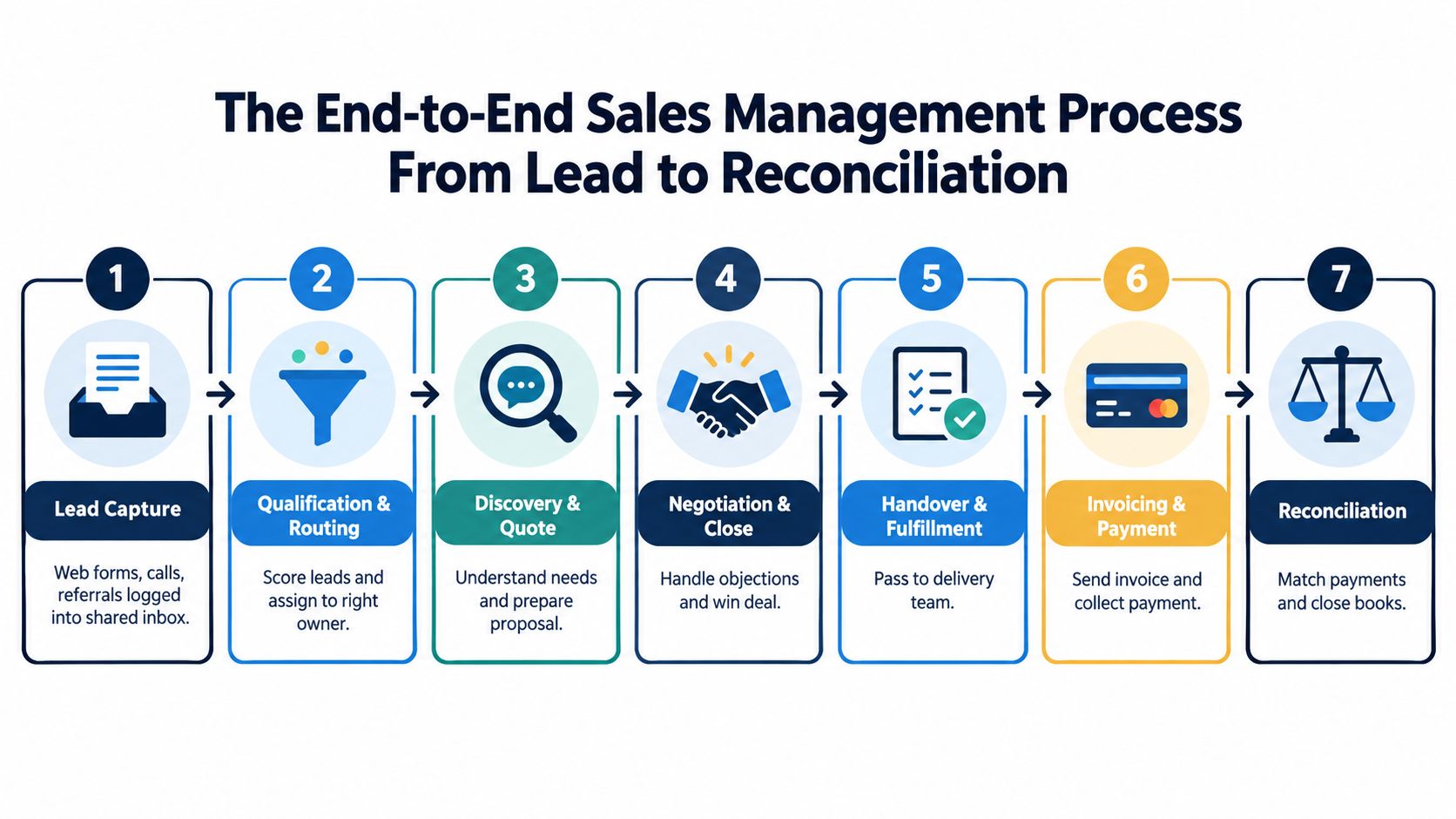
Lead capture and qualification
Start with one intake point for web forms, calls, and referrals. That doesn't mean one marketing channel. It means one place where the team can see what came in, when it came in, and who owns it next.
Speed matters here. Leads contacted within five minutes have been reported to convert at about 21%, versus 2.3% for next-day replies, and contacted leads can close at 32% versus 12% when contact slips beyond 24 hours, according to lead response time benchmarks from Perspective.
For a small team, that means two rules:
- Route inbound leads immediately to a named owner.
- Set a response standard for business hours so nobody “gets to it later.”
The owner at this stage is usually a sales rep, sales coordinator, or founder. The proof artifact is a logged lead with source, contact details, and next action.
Discovery, quote, and close
Once the lead is real, qualification and discovery should happen in the same working record. Notes belong with the deal. So do needs, timing, stakeholder names, and pricing assumptions.
For practical stage design and language, FullEnrich on B2B sales is a useful reference because it lays out the basic progression clearly. Small teams don't need enterprise theory here. They need clean movement from conversation to quote.
The quote should come from an approved template and current price list. The sales rep owns it. The sales lead or founder may approve discounts. The proof artifact is the quote itself, version-controlled, dated, and tied to the customer record.
If you're standardising this in a smaller setup, Kickstart 2 is one factual entry point to note. It includes the Sales module plus Finance & Invoicing, with €149 one-time pricing, lifetime access, and 150 credits/month.
A short visual helps if your team is still treating this as separate jobs instead of one flow.
Handover, invoicing, and reconciliation
After acceptance, the quote should convert into an order without retyping. That handoff usually moves from sales to operations or fulfilment. The proof artifact is a confirmed order generated from the accepted quote.
Then finance invoices from the fulfilled order, not from a disconnected note or forwarded email. Payment collection follows. Reconciliation closes the loop by matching payment against the invoice and updating the commercial record.
A handoff is only real when the next team can act without asking for the same information again.
Many SMEs lose control. They think the sale is “done” when the customer says yes. Operationally, it isn't done until payment is matched and the record is closed cleanly.
Roles and KPIs That Keep the Sales Process Honest
A sales management process fails when roles are fuzzy and metrics are decorative. Small teams don't need a giant dashboard. They need a few numbers that expose where work is stalling and who owns the fix.
Who owns what
In most SMEs, the structure is simple:
- Sales rep owns lead to quote
- Sales lead or founder owns pipeline hygiene and forecast judgment
- Operations owns order to fulfilment
- Finance owns invoice to reconciliation
One person may wear two or three of those hats. That's normal. What isn't acceptable is shared ownership with no final accountability.
There's also a management reality many owners underestimate. The Sales Management Association reports first-line sales managers spend an average of 31% of their time on company administration, as cited in Process Street's sales management benchmark summary. That's exactly why KPI review needs to be tight. If you drown the owner or sales lead in reporting admin, coaching disappears.
The few KPIs that matter
Use weekly review for indicators that need intervention fast. Use monthly review for trend metrics and structural decisions.
| Stage | KPI | Why it matters | Review cadence |
|---|---|---|---|
| Lead intake | Lead response time | Exposes whether inbound demand is being worked while intent is still fresh | Weekly |
| Qualification | Qualified-lead rate | Shows whether top-of-funnel volume is actually becoming real pipeline | Weekly |
| Quote stage | Quote turnaround | Reveals internal delay before the buyer even gets something to review | Weekly |
| Quote stage | Win rate | Tells you whether pricing, qualification, or sales execution is holding up | Monthly |
| Deal value | Average deal size | Helps spot discount drift or poor packaging | Monthly |
| Fulfilment | Order accuracy | Shows whether accepted quotes become clean operational orders | Weekly |
| Fulfilment | On-time fulfilment | Protects customer confidence after the deal is won | Weekly |
| Finance | Invoice disputes | Surfaces weak handoffs between sales and billing | Weekly |
| Finance | Cash collection | Shows whether booked revenue is turning into cash | Monthly |
Forecasts need discipline, not optimism
Forecast accuracy is where loose process gets exposed. Mature RevOps teams typically target forecast accuracy within 5% to 10% of actual revenue, while another benchmark describes elite performance as ±5% variance and good performance as ±10%, according to Avoma's forecast and pipeline metrics guide.
For an SME, the lesson is blunt. If stage definitions are soft, your forecast is theatre.
If you need a simple way to think about scorekeeping and visibility, this piece on how to choose KPIs for team rankings is useful because it forces you to distinguish between activity metrics and metrics that reflect progress.
Where Small Businesses Get Stuck in the Sales Workflow
Most bottlenecks in a sales management process aren't caused by lazy staff. They come from broken workflow design.
Owners often blame follow-up discipline. Sometimes that's fair. More often, the team is trying to run a connected process through disconnected tools, and the cracks show up as “people issues.”
The usual breaks
Lead capture leaks when enquiries land in personal inboxes. Quote turnaround slows when reps hunt for pricing in old files. Order errors appear when somebody retypes accepted quote details into an operations sheet. Invoicing gets delayed when finance doesn't trust what sales entered. Reconciliation drifts when payment matching happens in a spreadsheet after the fact.
The common reaction is to patch. Add a shared inbox rule. Create another spreadsheet tab. Forward the thread to finance. Build a checklist in chat.
Those aren't fixes. They're workarounds that preserve the break.
Common bottlenecks vs disciplined fixes by stage
| Stage | Common Bottleneck | Patchwork Fix | Disciplined Fix |
|---|---|---|---|
| Lead capture | Enquiries sit in personal inboxes | Forward emails manually to the team | Force all inbound enquiries into a shared intake with one owner |
| Qualification | Nobody knows who should respond | Ad hoc messages in chat | Route by territory, service line, or product responsibility |
| Quote | Pricing is pulled from old files | Keep a “latest prices” spreadsheet | Use approved pricing and one controlled quote source |
| Close to order | Accepted deal details are retyped | Copy and paste into an order form | Convert accepted quotes directly into orders |
| Fulfilment to invoice | Finance lacks order context | Ask sales for screenshots or notes | Trigger invoicing from the fulfilled order record |
| Payment to close | Bank matching is manual | Maintain a reconciliation spreadsheet | Match payments against invoice records in the same system |
Stop adding glue between tools. Remove the break that makes glue necessary.
Where a broader workspace starts to matter
Once you reach quote, order, invoice, and ops handoffs, this stops being just a CRM conversation. It becomes a systems conversation.
That's where owners should look at setups that include commercial and back-office flow together. Kickstart 3 is one example worth noting because it adds Accounting & Operations, Project management, and Marketing & Content, with €199 one-time pricing, lifetime access, and 300 credits/month.
If your process stalls after “deal won,” you don't need more reminders. You need fewer breaks between systems.
How AI Assistants and Integrated Platforms Streamline the Flow
AI is useful in sales management when it removes routine handoffs and keeps records current. It's not useful when it becomes another disconnected layer sitting on top of a messy workflow.
That distinction matters now because the operating model is changing. Recent coverage argues the pipeline meeting is shifting toward real-time inspection and action, and Gartner projects that by 2027, 95% of seller research workflows will begin with AI, up from less than 20% in 2024, according to MTF Institute's operating system analysis. Small teams should pay attention, but not by buying random AI add-ons.
What the assistant should actually do
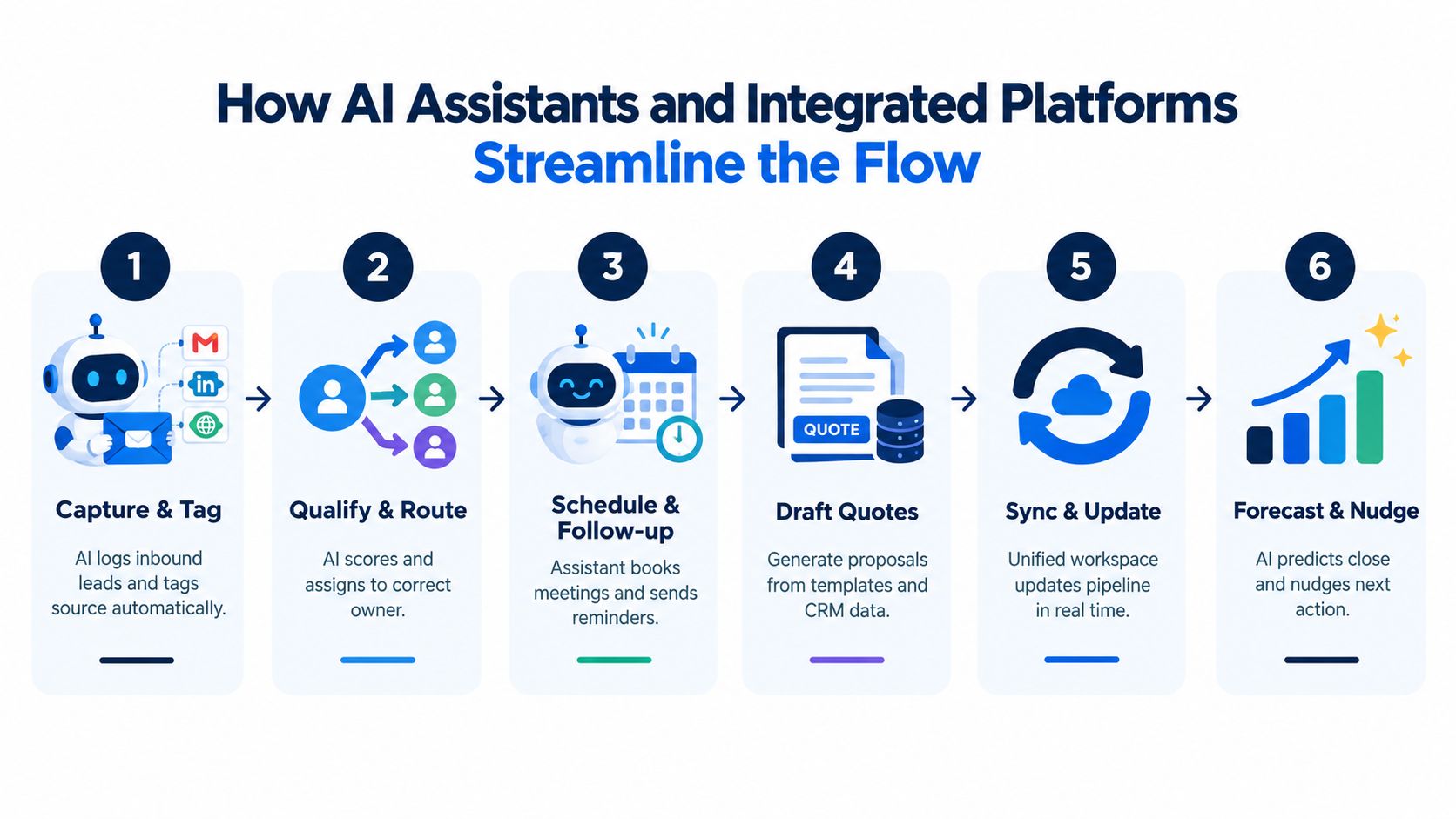
The right assistant handles repetitive tasks inside the same workspace where the data already lives.
Examples that matter:
- Capture and tag enquiries so the team doesn't log leads by hand
- Route records to the right owner based on service, region, or account type
- Draft first-pass quotes from approved templates and current price lists
- Create follow-up tasks when a quote sits untouched
- Generate orders from accepted quotes
- Prepare invoice runs after fulfilment
- Flag reconciliation mismatches when payment doesn't line up cleanly
That's practical automation. It compresses cycle time and cuts admin.
For a focused read on the front end of this, Captiwate AI qualification insights are useful because they point to where AI can support lead handling without replacing human judgment.
Why integrated beats stitched together
Most SMEs don't need a smarter CRM. They need a single operating workspace.
A CRM can improve forecast accuracy and pipeline visibility when deal stage, value, close date, and touchpoints update in one live record rather than in periodic manual refreshes, as explained in Belkins' pipeline conversion overview. But if quote, order, invoice, and payment sit outside that record, the benefit is partial.
That's why an integrated platform matters. Zynthoro is one example of that model. It keeps sales administration, communication, workflow, finance, and reconciliation data connected in one workspace, so the assistant isn't guessing across tools. It's acting on one shared record.
Keep people on judgment work
AI should not decide pricing strategy, stakeholder politics, or whether a customer is worth bending terms for. Owners and reps still own those calls.
The assistant should do the mechanical work. Humans should do the commercial work.
A Realistic Example of the Process Running on One Workspace
A practical example makes this easier to judge than any feature list.
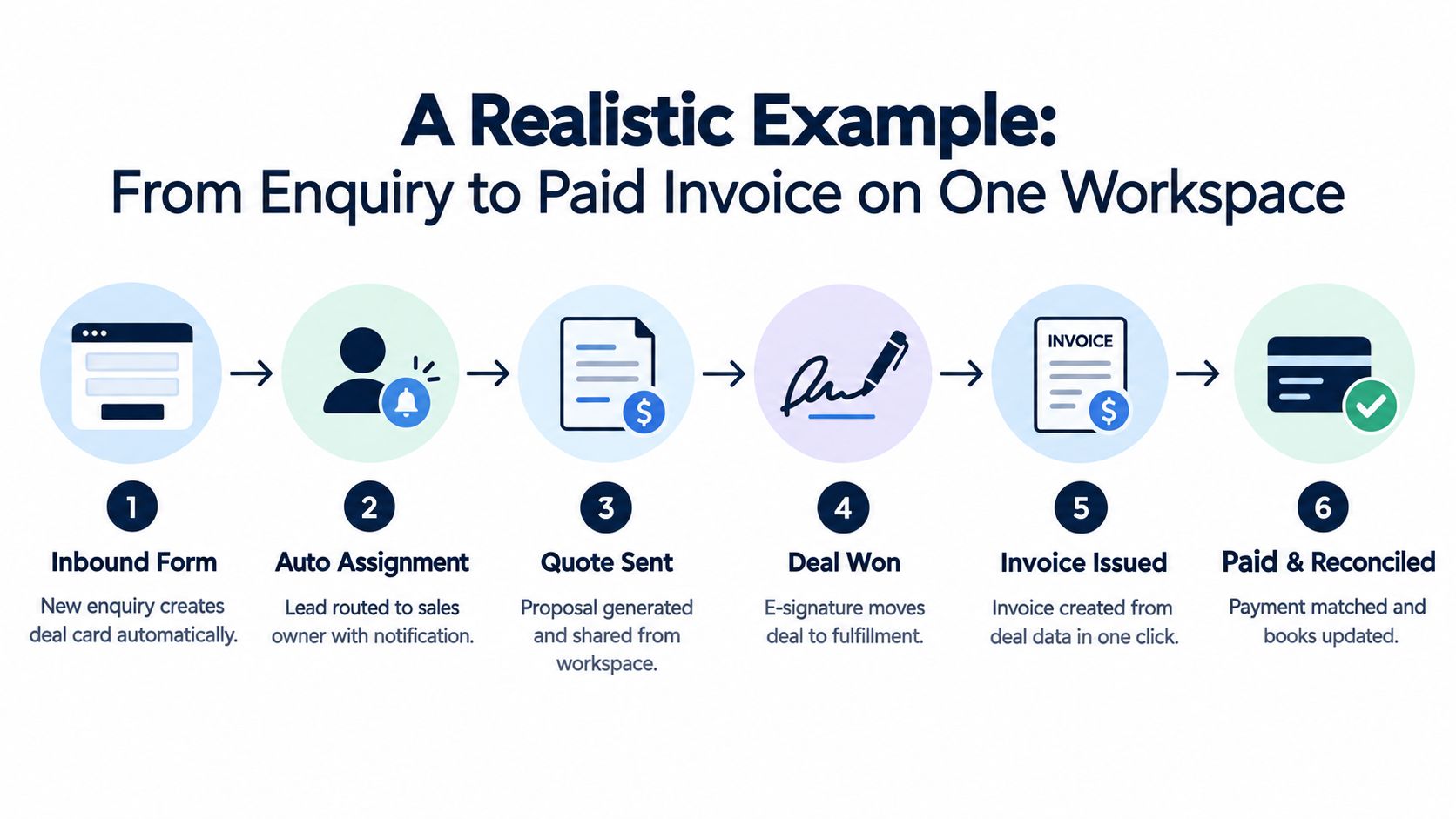
A customer submits a form asking for a quote on a repeatable service package. In a disconnected stack, that enquiry would land in email, get copied to a CRM later, and spawn at least two extra admin steps before a quote goes out. In one workspace, the enquiry creates the commercial record immediately.
One deal, one record, no retyping
The sales owner gets assigned automatically and opens the record. Customer details are already there. The owner adds discovery notes, confirms requirements, and prepares a quote using current pricing already stored in the system.
The customer accepts. Instead of forwarding an email to operations and rebuilding the order elsewhere, the accepted quote becomes the order. Operations can see exactly what was sold, what was agreed, and what needs to be delivered.
Once fulfilment is complete, finance issues the invoice from the same record. The customer pays. Payment is logged and matched. The books close against the same transaction trail.
Where most teams normally waste time
The hidden waste in the old setup sits in these moments:
- After the first enquiry, when somebody manually creates a second record
- After quoting, when version confusion starts
- After acceptance, when operations has to ask what was sold
- After invoicing, when finance checks whether the amount matches the quote
- After payment, when somebody updates yet another spreadsheet
None of that work helps the customer. It only exists because the process is fragmented.
The strongest sales management process is the one that removes duplicate admin before you try to coach harder.
Why this matters for small teams
A founder-led business feels this immediately. When one workspace carries the lead, quote, order, invoice, and payment trail, the owner doesn't need to chase status across four tools just to answer a basic question.
They can see whether the deal is late, whether fulfilment happened, whether billing went out, and whether cash landed. That's what operational visibility should look like.
Comparing Disconnected Tool Stacks With a Unified Sales Workspace
The easiest way to evaluate your current setup is to stop asking which app does what. Ask who owns the data between apps.
If the answer is “the team, by manual export and copy-paste,” your stack is costing more than the subscription total suggests.
Disconnected sales stack vs unified sales workspace
| Dimension | Disconnected Stack | Unified Workspace |
|---|---|---|
| Lead data | Captured in one tool, copied elsewhere later | Created once and carried forward |
| Quote handling | Often managed in documents or spreadsheets | Tied directly to the customer and deal record |
| Order handoff | Re-entered into ops or fulfilment tools | Converted from accepted quote |
| Invoicing | Triggered from finance app with extra clarification | Triggered from the commercial record |
| Payment tracking | Checked in bank portal and updated manually | Matched against invoice history in-system |
| Forecast reliability | Drifts because progress is spread across tools | Improves because movement updates one live record |
| Ownership of gaps | Nobody clearly owns data between systems | Internal owners manage one connected workflow |
| Admin load | High due to retyping and reconciliation effort | Lower because records move forward intact |
The switch decision owners should make
A unified workspace is the better model if your biggest costs are handoff friction, duplicate admin, and weak visibility after the quote stage.
Use this checklist:
- Map the crossings between your CRM, quoting files, invoicing app, and bank process
- List the three worst handoffs where staff retype or chase context
- Score consolidation fit by asking whether one record can survive the whole journey
- Pilot one flow first rather than moving the entire business at once
- Set a cutover date so the old process doesn't linger forever
Small businesses often delay this decision because the current stack is “good enough.” Usually it isn't. It's familiar, not efficient.
First Steps to Tighten Your Sales Management Process This Week
You don't need a three-month transformation plan to improve this. You need one disciplined week.
Five moves to make now
- Assign one owner per stage. Lead capture, qualification, quote, fulfilment, invoicing, reconciliation. Put names against each stage.
- Write the current handoffs on one page. Don't make this pretty. Just document where data moves from inbox to quote, quote to order, and order to invoice.
- Pull a one-week snapshot of delay. Look at where work sat waiting. You're not hunting perfection. You're looking for the handoff everyone already complains about.
- Delete one redundant tool or view. If two systems hold the same sales status, one of them has to go.
- Set a weekly fifteen-minute pipeline review. Focus on stuck quotes, missing next actions, pending invoices, and unpaid completed work.
Start where the admin pain is highest
For most SMEs, the best pilot isn't lead generation. It's quote to invoice.
That's the stretch where data gets re-entered, context gets lost, and cash gets delayed. Run that flow in one workspace first. Measure admin hours before and after. If the hours fall and errors drop, keep moving upstream and downstream until the full sales management process is connected.
Don't wait until the team is bigger. By then, the bad habits are harder to remove.
If your sales process breaks between the quote, the order, and the invoice, Zynthoro gives you one connected workspace to run that flow without bouncing between separate tools. It brings sales administration, finance, operations, and reconciliation into the same working record so a small team can manage the process cleanly. If that's the gap you're trying to close, visit Zynthoro.