


Friday afternoon, the client invoice is due, but the hours are scattered across a timer app, a spreadsheet, notebook pages, and Slack messages. Your project manager is asking who worked on the final revisions, finance is correcting a payroll entry, and nobody can say with confidence whether the fixed-fee project is still profitable.
That isn't a people problem. It's an operations problem. A time tracking system should capture work close to the moment it happens, connect it to projects and billing, preserve reliable records, and do all of that without turning the workplace into a surveillance exercise. For small businesses replacing disconnected tools, the right choice is less about a stopwatch and more about rebuilding the flow of operational data.
Table of Contents
- The Real Cost of Disconnected Time Tracking
- What to Lock Down Before Choosing a System
- Manual, Automatic, or Hybrid Time Capture
- Connecting Time Data to Projects and Invoices
- Staying Compliant With EU Working Time and GDPR
- Adoption Habits That Make the System Stick
- Replacing the Stack With One Workspace
The Real Cost of Disconnected Time Tracking
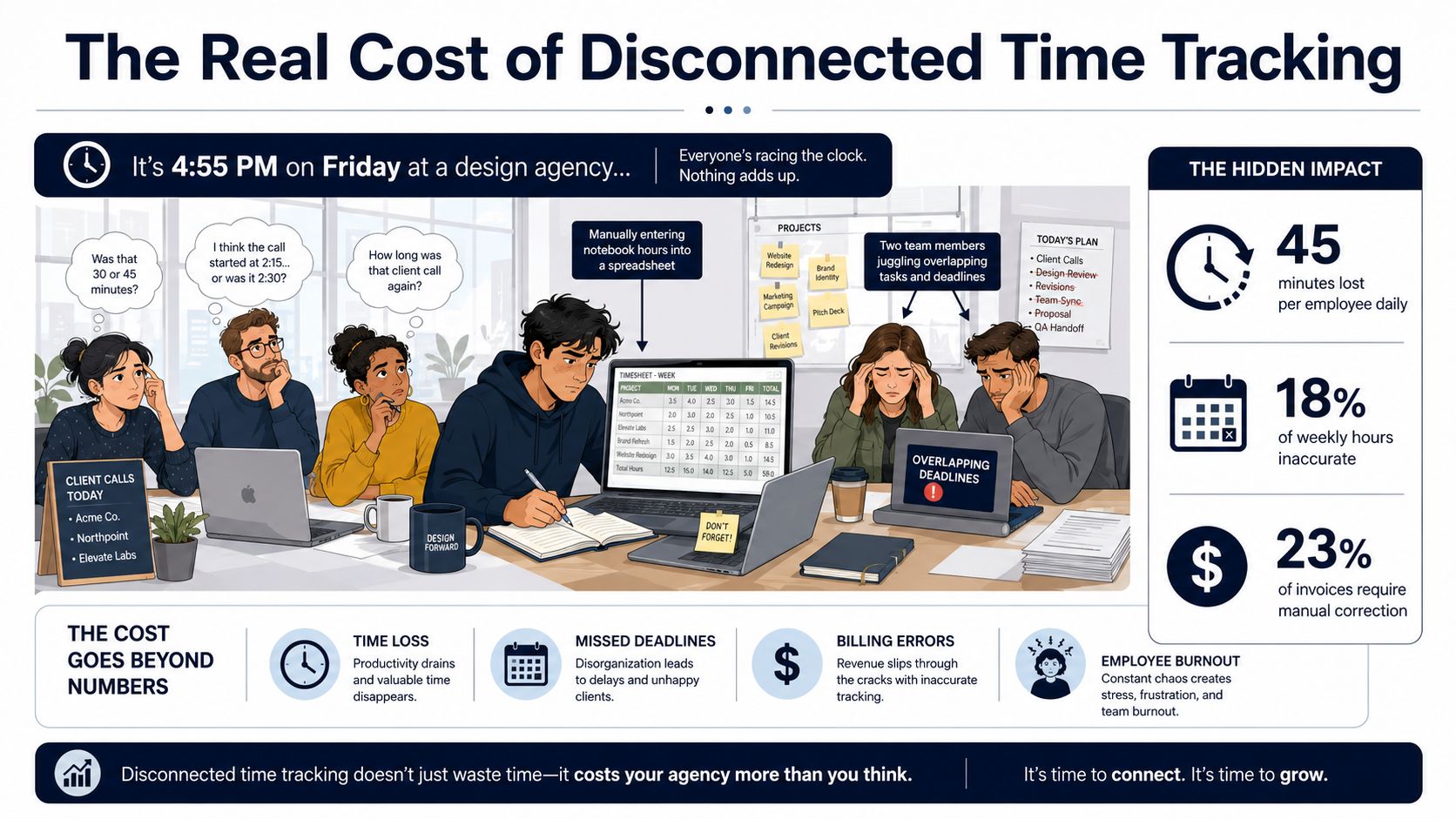
At 4:55 p.m., a six-person design agency has six different versions of the week. Three employees are trying to remember which client call ran long. One is retyping hours from a notebook into a spreadsheet. The project manager is chasing missing entries over Slack while finance waits for a usable timesheet.
That routine creates three direct leaks. Billable work gets buried under “admin time,” payroll needs manual correction when entries are wrong, and owners make pricing or hiring decisions from utilization data that arrived too late to be useful. Manual timesheets are already identified as the biggest time-tracking problem by 67% of customers, while 59% report that missed punches damage payroll accuracy and 31% need more accurate data for job costing and billing. These figures are summarized in Time and Date's history of timekeeping.
The financial leak is usually invisible
The most expensive error isn't always an obviously incorrect invoice. It's the hour nobody records because the employee forgot the timer, the project code wasn't available, or the team decided to reconstruct the week later. Once managers stop trusting the data, they stop using it to challenge scope creep, set prices, or plan capacity.
Accuracy declines quickly when people rely on memory. One benchmark reports 96% of managers say employees make mistakes when reporting working time, while 45% identify information accuracy as a major challenge. The same source says 53% believe cloud-based solutions would improve accuracy. See the EasyClocking time-tracking benchmarks for the cited survey summary.
Practical rule: If time data doesn't reach payroll, project control, or invoicing without retyping, you're paying for a record that still can't be trusted.
Treat the change as an operational cleanup project. Map where work is recorded, remove duplicate entry, define ownership for approvals, and make every captured hour point to a project, cost centre, payroll category, or internal activity. A system such as Zynthoro is relevant when the business wants time tracking connected to planning, project work, finance, and invoicing rather than isolated in another subscription.
What to Lock Down Before Choosing a System
Don't book vendor demos until you can describe what your time data must do. A polished interface won't fix unclear project codes, inconsistent billing rules, or a payroll process that still depends on spreadsheets.
Write a one-page decision brief with these questions:
- Who logs time: Include employees, contractors, managers, and field staff where their records affect payroll, billing, or project costing.
- Where hours go: Define the client, project, task, cost centre, or internal category attached to each entry.
- How billing works: State whether time feeds hourly invoices, retainer reviews, fixed-fee profitability, or only internal reporting.
- How leave is handled: Document sick leave, holidays, breaks, overtime, and corrections before configuring categories.
- Which source sets costs: Decide whether project budgets and labour costs come from finance, project management, or a shared master record.
- Which reports matter: Owners may need margin and budget burn, while managers may need workload, overtime, and unapproved entries.
Separate requirements from preferences
Mark each requirement as a must-have, useful, or irrelevant. Hard constraints should include GDPR-ready controls, EU data hosting where required by your policy, access permissions, audit trails, and export rights. If your team already uses Google Workspace or Microsoft 365, include SSO in the review. It matters less as a feature than as a way to avoid another set of credentials and another offboarding risk.
Then price the current mess. Count payroll corrections, missed billable work, time spent re-keying entries, invoice disputes, and the hours managers spend chasing submissions. Don't invent a savings target before you have that baseline. Your real budget ceiling is the cost you can plausibly remove, not the vendor's feature list.
Choose the system that removes a recurring handoff. A report nobody uses is not a benefit.
For a small team comparing entry points, Kickstarter is listed as a €79 one-time option with 40% of Starter, lifetime access, AI Assistants with 50 credits/month, Planning & Time Tracking, a Communication module, and Canva Studio. Treat that as a catalog choice, not a substitute for documenting your workflow first.
Manual, Automatic, or Hybrid Time Capture
Capture method determines whether the system survives the first busy month. Manual timers are familiar, automatic capture reduces recall errors, and hybrid workflows usually offer the best balance for agencies and small professional firms.
| Method | Pros | Cons |
|---|---|---|
| Manual | Simple to understand, gives users control over project and task coding, and can be inexpensive to introduce | People forget to start or stop timers, then reconstruct entries from memory |
| Automatic | Captures activity evidence in the background and can create richer draft records with less administration | Requires clear privacy rules, review habits, and sensible handling of idle time |
| Hybrid | Automatic capture creates a draft, the employee corrects classification, and a manager approves exceptions | Needs agreed review ownership and clear rules for edits |
Manual capture works for a disciplined consultant with a narrow client list. It becomes fragile when someone moves between a client call, internal review, email, and urgent support work. The problem isn't that employees are careless. The workflow asks them to interrupt work repeatedly, then expects perfect recall when the day gets crowded.
Automatic capture, the approach Zynthoro takes, can detect active windows, idle time, and meetings, then group that evidence into draft entries for confirmation or correction. That improves the starting point, but it doesn't remove judgment. An open design file may relate to several projects, and a meeting can contain both client work and internal discussion.
Make review part of the workday
Use a short daily review instead of a Friday reconstruction. Employees should confirm project, task, billable status, and unusual idle periods while the context remains fresh. Managers should review exceptions, not every ordinary entry.
The research on activity logs reinforces this design. A controlled comparison found 15 timestamp differences between observation and screen recording, and the observation method couldn't reliably reconstruct the exact start time afterward. It also recorded 13 time lags, showing how delayed capture can create timestamp drift. The findings are available in the DIVA research document on timestamp verification.
A hybrid policy is the sensible default for most SMEs. It limits administrative friction while preserving human confirmation before payroll or billing. If your team also needs a repeatable process for turning recurring work into scheduled actions, how to schedule a task offers useful workflow context.
For teams evaluating a broader operational package, Kickstarter 3 is listed at €199 one-time with 75% of Starter, lifetime access, Everything in K2, 300 credits/month, Accounting & Operations, Project management, and Marketing & Content.
Connecting Time Data to Projects and Invoices
A recorded hour has no commercial value until the business knows where it belongs. Configure the connection before launch, not after the first invoice goes out.
Start with a controlled naming structure. Every entry should attach to a client, project, and task, with billable or internal status clearly separated. Use role-based or person-specific rates where contracts require them, and define who can change rates. A project manager may approve time, but finance should own the billing logic.
| Engagement Model | Time Tagged To | Rate Logic | Invoice Trigger |
|---|---|---|---|
| Hourly support | Client, support agreement, and ticket or task | Contracted rate by role or person | Approved entries at the billing close |
| Fixed-fee project | Client project, phase, and task | Internal cost rate for margin, contract fee for invoicing | Milestone or project review, with time used for profitability |
| Retainer | Client, retainer period, and service category | Agreed recurring fee, with optional overage rate | Period close and approved usage review |
| Hybrid engagement | Separate fixed-fee and hourly workstreams | Distinct rules for each workstream | Milestone invoice plus approved hourly items |
Build one source of truth
The project card should hold scope, assigned owners, budget, actual time, and invoice context. If finance has one project name, the project manager has another, and the timer uses a third, reconciliation becomes a permanent job.
A clean workflow looks like this:
- Create the project once: Add the client, engagement model, budget, owners, and billing rules.
- Capture against approved codes: Let employees select existing tasks instead of inventing labels.
- Separate billable from internal work: Internal planning still matters for cost and capacity, even when it isn't invoiced.
- Approve exceptions: Review late entries, uncategorized time, rate changes, and entries over budget.
- Generate a draft invoice: Finance checks the source records, applies contract rules, and sends without re-keying.
Tools used by small firms often need to connect more than time and invoicing. A practical way to review available connection points is the Loopfour integrations directory. The principle is simple: integrate only where data ownership is clear, and don't create a complicated chain that nobody maintains.
Zynthoro's connected workspace is designed for automatic time capture per project, client, and task, alongside project management, accounting, invoicing, and finance workflows. That makes it a candidate for businesses that want a closed loop rather than another export file.
Staying Compliant With EU Working Time and GDPR
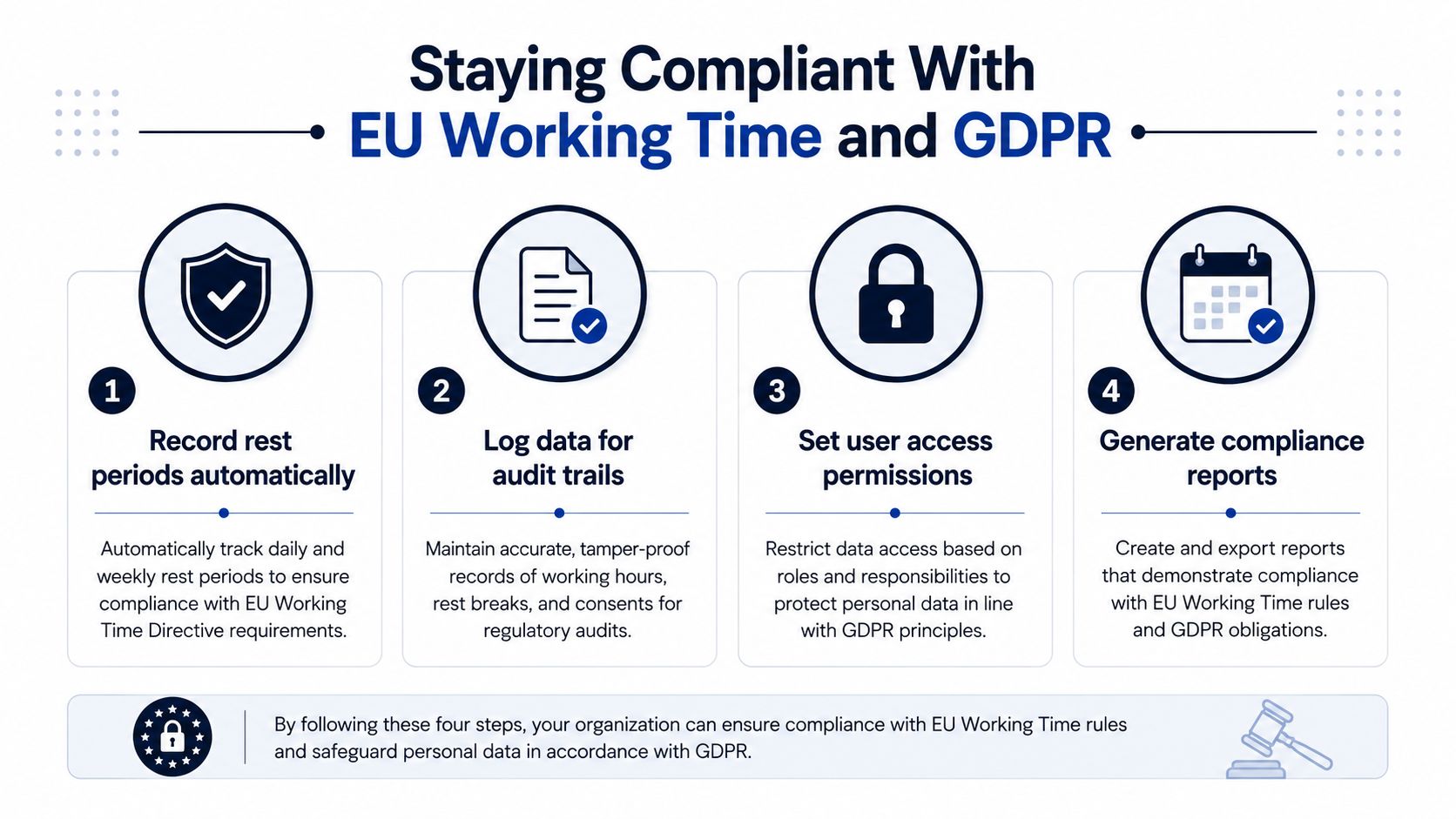
Compliance needs to be designed into daily records. The Court of Justice of the European Union held in Case C-55/18, CCOO v Deutsche Bank, that EU member states must require an objective, reliable, and accessible system for recording each employee's daily working time. The ruling is summarized for employers in Temponia's guide to mandatory time tracking in Europe.
For an SME, that means recording more than clock-in and clock-out. Your process should preserve start and finish times, breaks, rest periods, overtime, and total hours worked, with records available for review during an inspection. National rules determine the specific retention period. One industry summary describes a four-year retention period as a general rule, so confirm the applicable requirement before setting deletion policies. See Clockify's overview of EU time-tracking law.
Apply GDPR to the workflow
Work-hour data is personal data. Choose a lawful basis, tell employees what you collect and why, restrict access, protect stored records, and define retention and deletion rules. Don't collect screenshots, location data, or activity detail merely because a vendor makes it available. Collect what payroll, billing, safety, or compliance requires.
A reasonable SME policy might capture start and finish times, project codes, approved breaks, and overtime, while limiting individual access through role-based permissions. Explain the policy before launch, give employees a way to inspect or challenge records, and retain an audit trail for corrections. For finance leaders who need a broader control checklist, Resolut's guide to GDPR for CFOs provides useful governance context.
Privacy standard: Track the time required to run the business, not every action an employee takes.
Zynthoro's stated controls include GDPR readiness, audit trails, role-based access, and EU-hosted infrastructure. Those controls support a proportionate process, but they don't replace the employer's responsibility to document purpose, access, retention, and employee communication.
Adoption Habits That Make the System Stick
A common rollout pattern sees teams lose momentum after the launch meeting. The team understands the button, then a deadline arrives, entries move to the end of the week, and managers accept incomplete data. Prevent that slide with a routine that takes less effort than chasing and correcting records.
Use a routine people can repeat
Start each day with task setup. Employees check the projects and priorities they expect to handle, then use automatic capture or a manual timer to create the record. Keep task names specific enough to classify work, but avoid a taxonomy so detailed that selecting a task becomes its own administrative burden.
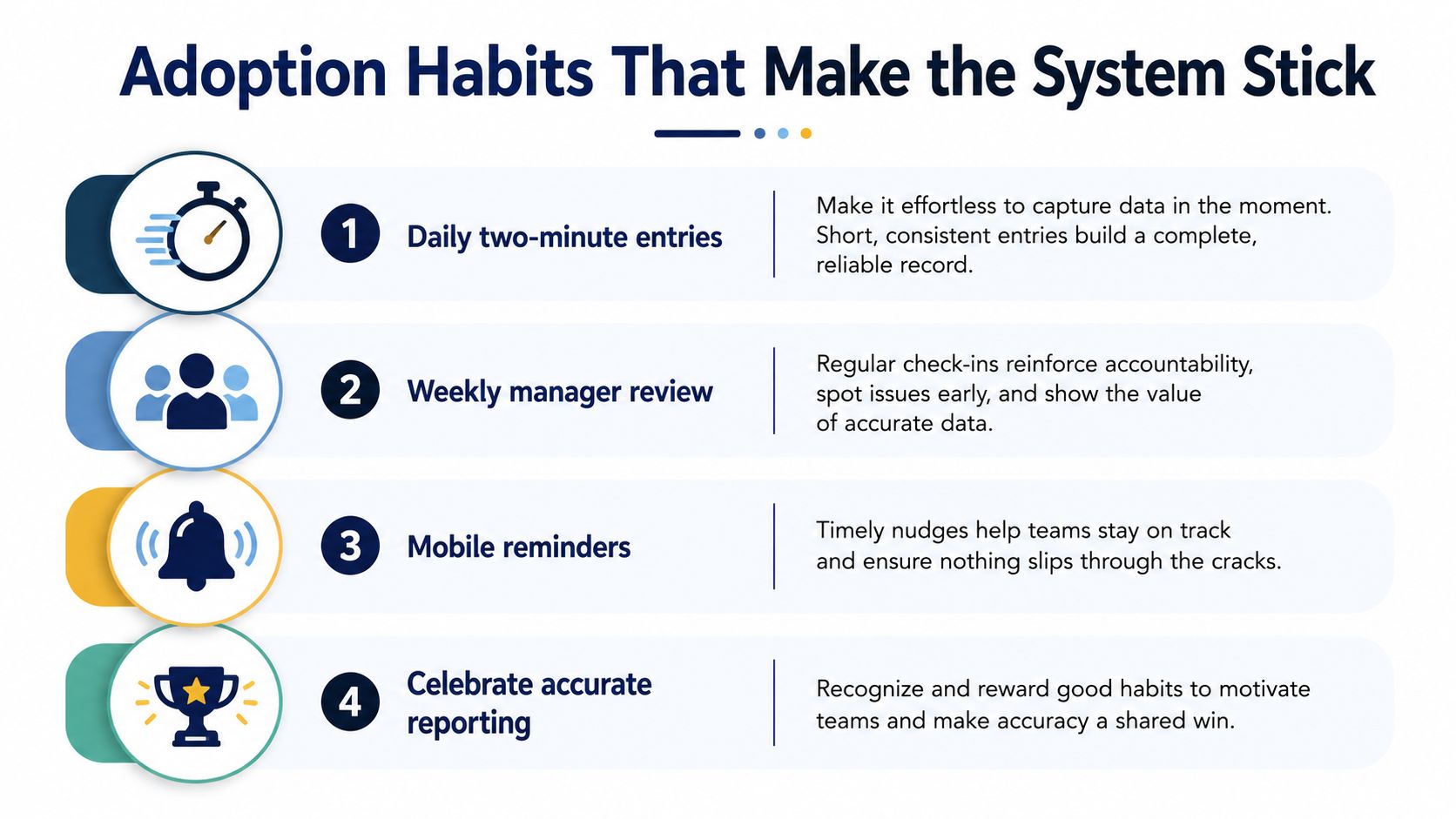
Use this cadence:
- Daily two-minute entry check: Confirm projects, billable status, breaks, and unusual gaps before leaving work.
- Weekly manager review: Check uncategorized time, late submissions, budget pressure, and workload imbalance.
- Mobile reminders: Prompt people working away from their desks or moving between meetings and field tasks.
- Celebrate accurate reporting: Recognize clean project records and useful forecasts, not long hours or visible activity.
Managers should review patterns and exceptions, not rank employees by tracked time. Time data can expose an overloaded project, an unclear brief, or a recurring approval delay. It should not become a crude performance score.
Close the month deliberately
At month-end, finance approves payroll-related records, project managers review budget burn, and owners examine billable versus internal work. Keep the report set small. Remove any dashboard that does not lead to a decision.
Same-day entry matters because delayed reconstruction weakens project allocation. A benchmark summary reports about 67% accuracy for same-day entries, compared with roughly 48% to 55% correct-project allocation when entries are completed every few days or at week-end. The EasyClocking benchmarks provide that comparison.
The habit that matters most is reviewing records while the work is still understandable. That is how a tracking system supports accurate billing instead of becoming another disconnected administrative tool.
Replacing the Stack With One Workspace
A small agency often pays for separate time tracking, project management, invoicing, reporting, chat, and document tools. The cost isn't only the subscriptions. Employees also pay the switching cost, finance retypes data, managers reconcile conflicting project names, and owners wait for a spreadsheet before seeing margin.
Consolidation works when the workspace shares one underlying record. A project card should hold scope, assigned owners, live budget burn, captured time, approval status, and the invoice that time will eventually feed. Automatic capture should produce a draft timesheet, the employee should confirm it, the manager should approve exceptions, and finance should work from the approved record.
Score the operating model, not the feature list
Use a simple review:
| Criterion | Stacked tools | Zynthoro workspace |
|---|---|---|
| Time capture quality | Depends on a separate timer and user discipline | Automatic capture per project, client, and task |
| Integration depth | Requires connectors, exports, and maintenance | Connected planning, projects, finance, invoicing, and operations |
| Reporting clarity | Reports are spread across systems and may use different codes | Shared operational context across modules |
| EU data residency | Must be checked across every vendor | EU-hosted workspace is part of the stated platform setup |
| Total monthly cost | Multiple subscriptions plus reconciliation time | One platform model, evaluated against actual scope and plan terms |
Zynthoro is an AI-native ERP platform with connected modules for planning, time tracking, project management, accounting, invoicing and finance, HR, communication, operations, and marketing. Its time tracking capability is described as automatic capture per project, client, and task, while its compliance controls include audit trails and role-based access.
Roll out in one working week
Don't migrate every historical record before proving the workflow. Import active projects on day one. On day three, switch one pilot team. On day five, generate the first invoice from captured time. On day seven, retire the legacy timer for that pilot and document what still needs adjustment.
The category has commercial scale, with one estimate placing the global time tracking software market at USD 6.13 billion in 2025 and projecting USD 17.39 billion by 2033, a 14.2% CAGR from 2026 to 2033. A separate estimate places the market at USD 6.1 billion in 2025 and projects USD 11.43 billion by 2030, with SMEs accounting for 62.8% of global revenue in 2024 and reporting a 12.5% CAGR. These estimates appear in Grand View Research's time tracking software market report.
For a five-person team, consolidation isn't a cosmetic preference. It removes duplicate entry, makes project economics visible, and gives finance a record it can use without hiring a dedicated operations administrator.
Zynthoro brings automatic project-level time capture together with planning, projects, invoicing, finance, and GDPR-ready controls in an EU-hosted workspace. Visit Zynthoro to assess whether replacing your disconnected tools with one operational record fits your team.