


You've landed your first enterprise client. The work is ready, the contract is signed, and then a procurement manager asks which employees can view customer pricing. HR wants confirmation that payroll is restricted to the right people. A security questionnaire arrives asking for your access policy.
Until now, your team may have shared logins, copied permissions from one employee to another, or relied on memory when someone changed jobs. That approach becomes difficult to defend as soon as a client asks for evidence. The practical answer isn't another password spreadsheet. It's a deliberate way to assign access according to each person's job.
Table of Contents
- The Moment Every Growing Team Faces the Access Question
- What Role-Based Access Actually Means in Plain Language
- How Roles, Permissions, and Users Fit Together
- Designing Roles for a Real Small Business Workflow
- Building Your First Role Matrix Step by Step
- RBAC, GDPR, and Audit Trails Working Together
- Common Misconceptions That Hold Teams Back
- Your Role-Based Access Checklist for This Week
The Moment Every Growing Team Faces the Access Question
Monday morning starts with three requests that seem unrelated. Procurement wants to know who can see pricing data. HR needs proof that payroll is limited to the appropriate staff. Your new client wants to understand how your company controls access to business information.
You open several disconnected tools and discover the underlying problem. Finance permissions live in one system, employee records in another, project files somewhere else, and the shared operations account has access to more than anyone can clearly explain. A former employee's login may still exist. A new project lead may have inherited finance access just because their predecessor had it.
That's when access stops being an IT detail and becomes an operations question. Who needs to see or change each record, and why?
Role-based access control, usually shortened to RBAC, gives you a structured answer. Instead of granting permissions one person at a time, you create access roles around business responsibilities. The Finance role receives the permissions needed for accounting work. The HR role receives the permissions needed for personnel administration. People then receive the roles that match their current duties.
The approach fits the way a small business already works. You don't ask whether an employee is trustworthy before deciding whether they should approve a supplier payment. You ask whether payment approval belongs to their job, whether another person should release the transfer, and whether the decision can be reviewed later.
In an all-in-one ERP such as Zynthoro, that structure can connect finance, HR, sales, projects, and operations through one identity layer. RBAC becomes the quiet control that keeps daily work moving while making access decisions easier to explain to clients, auditors, and your own team.
What Role-Based Access Actually Means in Plain Language
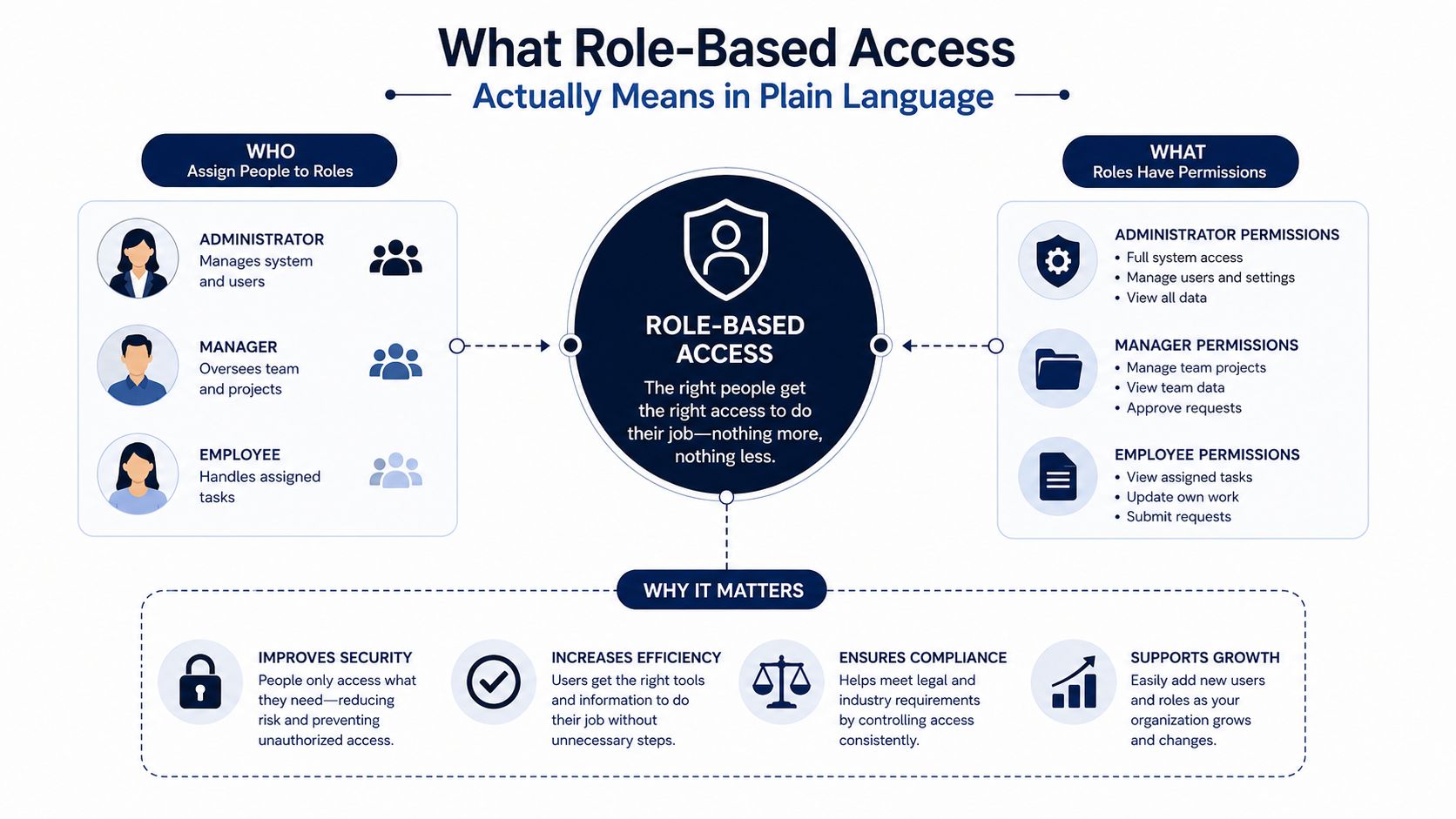
Think of RBAC as a labelled keyring. Each label represents a job, and each key opens a particular door. A Finance Clerk might carry keys for supplier invoices and journals. A Warehouse role might open inventory screens. An HR role might open employee records and leave workflows.
The role is the job label, not the person. A role might be Finance Clerk, Project Lead, or HR Manager.
A permission is a specific action. It could allow someone to view a payroll summary, create a purchase order, reconcile a bank feed, or approve an invoice. NIST describes RBAC as a model in which access depends on an assigned role, permissions are attached to roles, and operations are performed according to those permissions in the system's objects and resources. NIST's RBAC overview
A user is the actual person who receives one or more roles. One employee may hold Finance and Owner roles, while another may receive only Warehouse access. A session is the active period in which the user signs in and works under those assigned rights.
The keyring test
Ask one simple question for every permission: Does this person need this key to complete an assigned task? If the answer is no, leave it off the role.
That's the practical meaning of least privilege. Staff receive the access required for their work, not a master key to every module. If one account is compromised, the exposure is narrower than it would be with a shared administrator login.
For a small company comparing practical ERP options, Kickstarter 2 includes Finance & Invoicing, a Sales module, an AI photo/video suite, and 150 credits per month as part of its listed product snapshot. The access model still needs deliberate configuration, regardless of the package selected.
RBAC isn't about blocking people for its own sake. It's the connective tissue that lets finance, HR, sales, and operations share one platform without giving every employee the same view of the business.
How Roles, Permissions, and Users Fit Together
The core mechanic is simple. Permissions attach to roles, and roles attach to users. NIST's RBAC reference model also includes role hierarchies and separation-of-duty constraints, allowing organizations to inherit appropriate permissions while preventing combinations that create avoidable risk. NIST's RBAC reference model and FAQ
Consider accounts payable in Zynthoro. An AP Clerk role can enter a supplier invoice, attach supporting documents, and send the invoice into review. That role can't post the payment. A Finance Manager role can approve the payment, but the person who raises a transfer shouldn't also be the person who releases it.
This is separation of duties. It doesn't require maximum restriction. It requires you to separate actions where one unchecked person could create and complete the same sensitive transaction.
| Role | Allowed Actions | Blocked Actions | Risk Prevented |
|---|---|---|---|
| AP Clerk | Enter supplier invoices, attach documents, submit for review | Approve or release supplier payments | Prevents one user from creating and paying an invoice |
| Finance Manager | Review invoices, approve payments, reconcile accounts | Release a transfer they personally raised | Reduces the risk of self-approval |
| Purchase Requestor | Create purchase requests and provide business justification | Approve their own request | Separates the request from the decision |
| Payment Approver | Confirm approved payments and review supporting records | Edit the original supplier request | Preserves an independent approval trail |
A user can hold more than one role, so combinations need testing. Giving someone Finance and Project Lead access may be reasonable if they manage project margins and billing. Giving the same person requestor, approver, and payment-release rights may not be.
Practical rule: Design the role combination first, then assign the person. Don't start with a person and copy whatever access their predecessor had.
NIST also distinguishes static and dynamic separation of duties. Static constraints can stop incompatible roles from being assigned together, while dynamic constraints can limit what a user may do within a particular workflow or session. In Zynthoro, role templates can help an owner compose, test, and revoke access combinations without rebuilding individual permission grants.
The aim is steady, auditable control. Employees should be able to complete their work without asking an administrator for access to every ordinary screen, while sensitive actions remain clearly separated.
Designing Roles for a Real Small Business Workflow
A small business replacing disconnected tools usually starts with four useful role boundaries: Owner, Finance, HR, and Project Lead. These aren't permanent labels. They're a practical starting point for mapping responsibilities inside Zynthoro.
The Owner needs a broad business view. That may include finance dashboards, inventory status, CRM activity, and operational reporting. Broad visibility doesn't mean every action should be available. The Owner might review a payment approval while delegating daily invoice entry and bank reconciliation to Finance.
Finance needs access to accounting and invoicing workflows. The role may post journals, reconcile bank feeds, manage invoices, and view payroll summaries. It shouldn't edit employee addresses or change personnel records because payroll information appears in a finance report.
HR manages employee records, onboarding checklists, leave requests, contracts, and related personnel workflows. HR shouldn't approve vendor invoices or alter accounting records. Keeping those boundaries visible protects both personal data and financial controls.
The Project Lead creates quotes, assigns tasks, monitors delivery, and views project margins. That role can make commercial and delivery decisions without receiving permission to post entries in the general ledger.
| Role | Modules Accessed | Key Permissions | Cannot Do |
|---|---|---|---|
| Owner | Finance, inventory, CRM, operations | Review dashboards, inspect business performance, oversee approvals | Need not perform every routine transaction |
| Finance | Accounting, invoicing, purchasing | Post journals, reconcile bank feeds, manage invoices, view payroll summaries | Edit employee addresses or manage personnel records |
| HR | HR and personnel workflows | Manage employee records, onboarding, contracts, leave requests | Approve vendor invoices or post accounting entries |
| Project Lead | Sales, project management, reporting | Create quotes, assign tasks, view project margins | Change the general ledger or release payments |
The classic failure is one person raising and approving their own purchase order. Separating the request, review, and payment actions prevents that combination without stopping the purchase process.
For teams that need broader operational coverage, Kickstarter 3 lists Accounting & Operations, Project management, Marketing & Content, and 300 credits per month, alongside the features included in K2.
The advantage of a unified ERP is identity continuity. When a new hire joins, you assign the appropriate role in one system instead of configuring six separate tools and hoping the permissions match.
Building Your First Role Matrix Step by Step
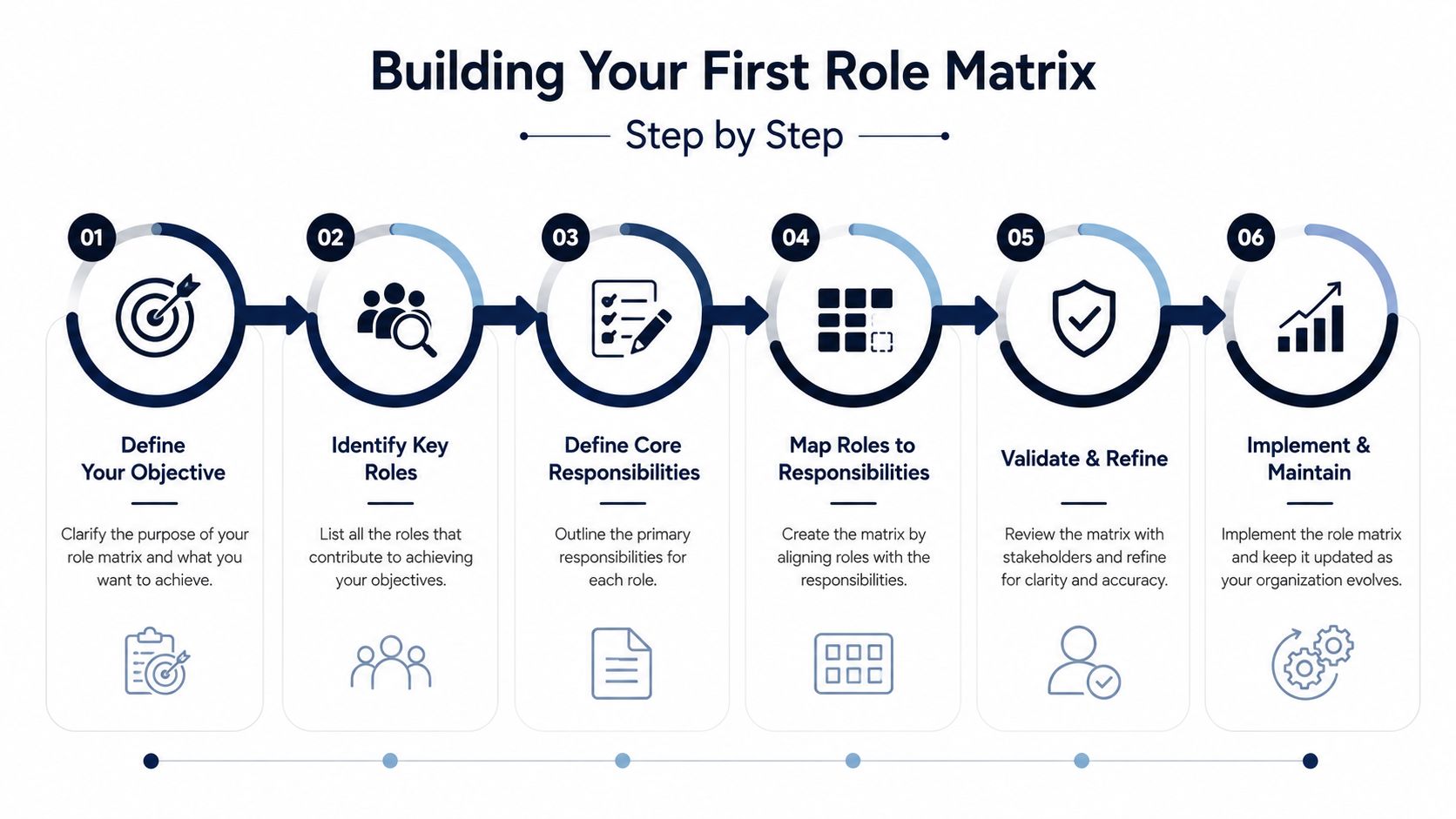
Role design works best as a working document, not a one-time technical exercise. Start with the business process and work outward to the permission.
Map the full workflow. Write down each process from beginning to end. For purchasing, that might run from purchase request to supplier order, receipt, invoice, approval, and payment. Do the same for a sales order, onboarding, payroll review, and month-end close.
Identify the current owner. Note who performs each action today, then look for natural boundaries. The person who prepares a supplier invoice may be different from the person who approves it. If one person currently does both because the team is small, record that as a risk to revisit rather than hiding it.
Draft the role in Zynthoro. Select the relevant modules and enable individual actions. Avoid blanket access when the job only requires viewing, creating, or submitting records.
Write the reason beside each permission. “Finance needs bank reconciliation to close accounts” is useful documentation. “Copied from the old user” isn't. This explanation helps the next administrator decide whether access still belongs there.
Pilot with two trusted users. Give the draft roles to people who perform the work and ask where they're blocked or exposed. Friction usually reveals a missing permission, while unexpected visibility can reveal an overbroad one.
Review on a recurring schedule. Set a quarterly access review, and trigger an earlier review when someone changes jobs, leaves the business, or takes on a new process.
When to split or merge a role
Split a role when an audit finding shows that permissions are too broad, when two duties should be separated, or when team growth makes one role cover unrelated work. A team growing above fifteen users is a useful signal to inspect role boundaries more carefully, but it isn't a universal rule.
Merge roles when a two-person company is forced to maintain too many tiny access profiles and the same people necessarily wear several hats. Keep the sensitive approval boundaries clear even when one user needs multiple operational roles.
A role matrix should change as the company changes. Treat it like a process map that needs maintenance, not a configuration file that can be forgotten.
The process is easier to follow when the team can see the sequence visually:
RBAC, GDPR, and Audit Trails Working Together
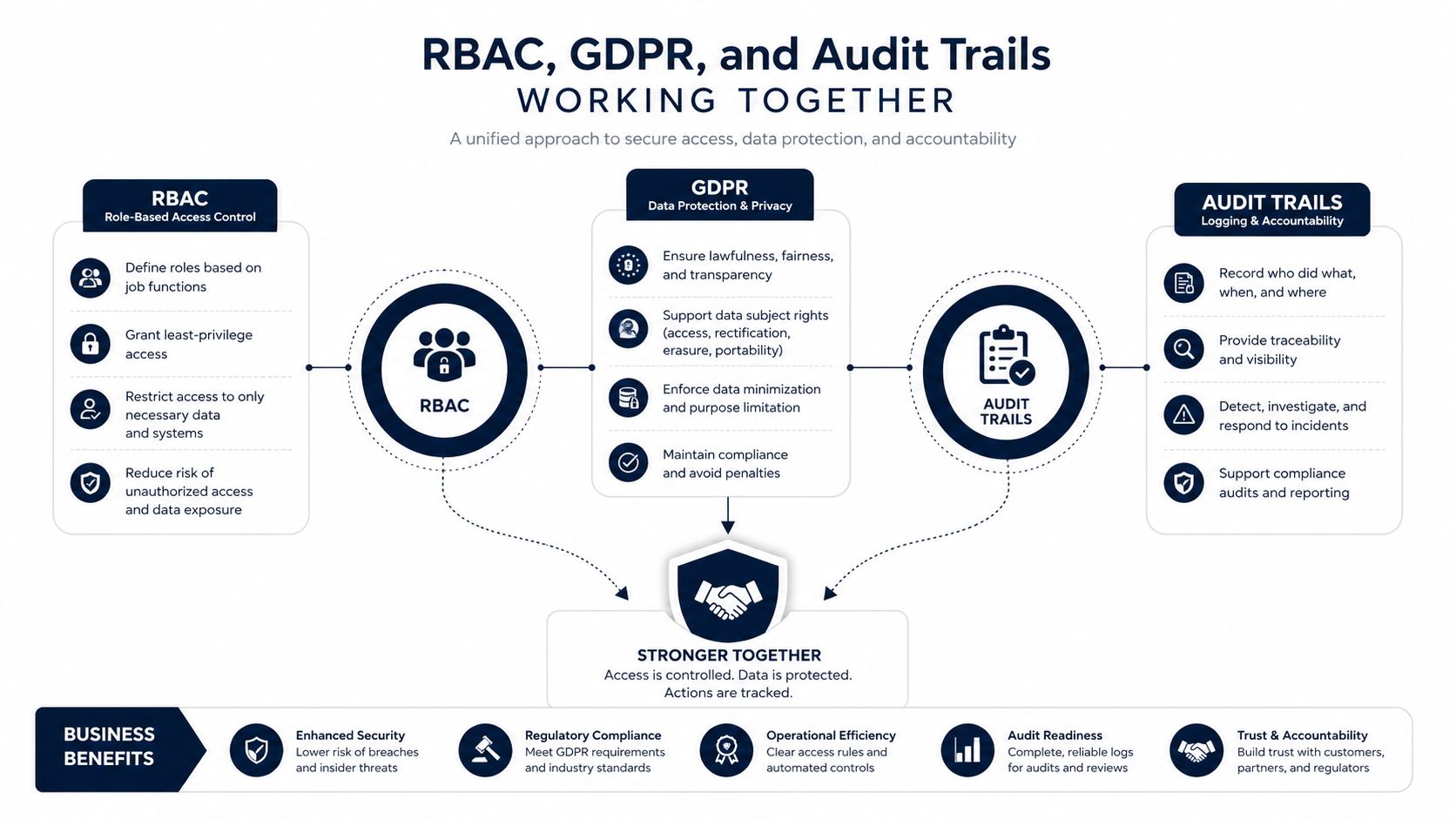
RBAC supports GDPR accountability by limiting access to personal data according to assigned work. NIST's least-privilege guidance says organizations should allow only the access needed for assigned tasks, which gives a clear operational basis for restricting payroll, customer records, and employee information. NIST's AC-6 control guidance
The role matrix answers who should be able to access a record. Audit logging helps answer what happened when someone used that access. In an ERP, that can include a person viewing a customer record, exporting payroll data, changing a supplier bank detail, or modifying a permission.
Red Hat's documentation describes audit entries that can record administrative changes, permission evaluations, policy updates, who performed an action, when it occurred, and whether access was allowed or denied. Red Hat's RBAC audit-log documentation
From scattered evidence to a routine review
Without defined roles, logs can become a long list of events with little context. If everyone has broad access, an export may be technically recorded but difficult to judge. A well-designed role matrix gives the event meaning because reviewers can compare the action with the person's assigned responsibility.
For an SME, a monthly review might ask:
- Payroll access: Can only the intended HR and finance roles view payroll summaries?
- Supplier changes: Are bank-detail edits limited to the appropriate finance workflow?
- Customer records: Does the Project Lead see the records needed for delivery without receiving unrelated personnel data?
- Administrative changes: Are role assignments and permission updates documented and approved?
Zynthoro lists compliance and security capabilities that include GDPR readiness, audit trails, and role-based access. A smaller business can use those controls as part of its operating routine, while still obtaining legal advice for its specific processing activities and responsibilities.
Kickstarter lists AI Assistants, Planning & Time Tracking, Communication, and Canva Studio, with 50 credits per month in its product snapshot.
The important pairing is simple: RBAC defines the expected boundary, and audit trails show whether activity stayed within it. Together, they make access reviews more concrete and easier to explain.
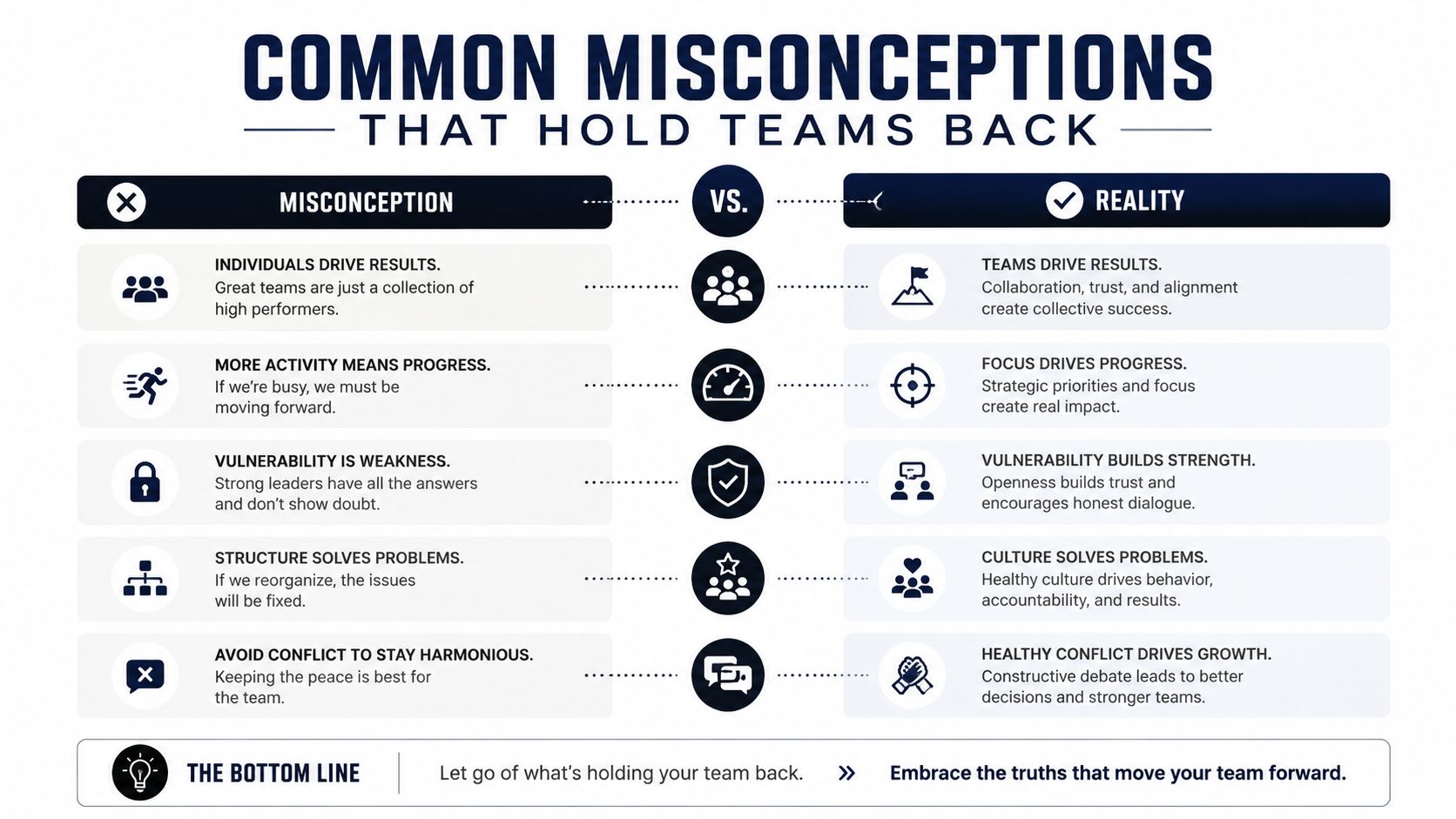
Common Misconceptions That Hold Teams Back
RBAC is an IT project
The business owner or operations lead should help design the roles because they understand the actual work. IT can support configuration, identity, and technical safeguards, but it shouldn't decide alone whether a Project Lead needs margin visibility or whether HR should edit supplier invoices.
In Zynthoro, the useful discussion starts with workflow questions. Who prepares the purchase request? Who checks the budget? Who approves the supplier payment? Who needs to see the result? Those answers form the role matrix.
RBAC slows teams down
Poorly designed access slows people down. A thoughtful role usually does the opposite by putting the right modules and actions in front of each user. A Finance Clerk shouldn't need to search through production or marketing screens to find supplier invoices, and a Project Lead shouldn't need access to payroll records to manage delivery.
The test is not whether every employee can open every screen. The test is whether each employee can complete their assigned process without unnecessary requests or unsafe workarounds.
RBAC alone equals security
RBAC is the access backbone, not the entire security program. You still need individual accounts, sensible onboarding and offboarding, audit logs, periodic reviews, and controls for service accounts and integrations.
That last point matters as more businesses rely on automation. A 2026 report cited by the NHI Support Guidance Forum says only 20% of organizations have formal offboarding and API-key revocation processes, while 97% of non-human identities carry excessive privileges and 80% of identity breaches involved compromised non-human identities, including service accounts and API keys. The NHI Support Guidance Forum's 2026 RBAC coverage
A separate 2026 analysis cited on the same topic says 26.7% of respondents had dynamic role-based access control supporting AI and analytics, which highlights why machine users and AI agents need explicit scopes rather than inherited employee permissions. Treat those findings as a warning to include non-human identities in your access review.
Your Role-Based Access Checklist for This Week
Don't wait for the next client questionnaire. Use the next working session to create a clear baseline inside Zynthoro.
Export the current user list. Mark accounts that haven't logged in for thirty days, then confirm whether each one is still needed. Don't delete an account solely because it's inactive. Verify its owner and business purpose first.
Name the foundational roles. Create Owner, Finance, HR, and Project Lead as a starting point. Assign one named person to each role, even if one employee temporarily holds more than one.
Inspect the role matrix. Confirm that permissions map to modules and business actions, not unexplained individual grants. Check sensitive actions such as payment approval, payroll visibility, supplier-bank changes, and general-ledger posting.
Separate high-risk combinations. Test whether the person who raises a purchase order can approve or release it. If the business is too small for complete separation, document the compensating review that another person performs.
Enable audit logging. Confirm that administrative changes, permission decisions, and relevant record activity can be reviewed. Use the logs to investigate exceptions rather than collecting them without ownership.
Schedule a monthly review. A quarterly role-design review is useful for structural changes, while a monthly access check keeps inactive users, new hires, and changed responsibilities visible.
Document sign-off. Store the role matrix in a shared note with the approval date, the person responsible for review, and the event that triggers an early update.
Start with the workflows that matter most to your client commitments, cash movement, payroll, and personal data. A small, accurate role matrix is more useful than a large one nobody maintains.
Zynthoro brings finance, sales, projects, HR, operations, compliance, and audit trails into one EU-hosted ERP workspace, giving SMEs one place to apply role-based access to connected workflows. Visit Zynthoro to review the platform and start turning this week's checklist into a working access model.